The best Minecraft texture packs for better graphics right now are Faithful 32x for a sharper vanilla look, Stay True for a 16x refresh that runs on almost any computer, and Fresh Animations if you want mobs that move like living creatures. Pair one of them with a shader and the game looks brand new. Below are my ten picks, what each one needs to run, and how to install them in about five minutes.
Key Takeaways
- Faithful 32x is the safest all-around pick, and it already has a build for Java Edition 26.3.
- 16x packs like Stay True and Bare Bones look cleaner without costing you frames.
- Fresh Animations needs Entity Model Features and Entity Texture Features (or OptiFine) to work.
- Download packs only from Modrinth, CurseForge, Planet Minecraft, or the creator’s own site.
- Texture packs and shaders do different jobs. The biggest visual jump comes from using both.
What Minecraft Resource Packs Actually Change
Texture packs have officially been called resource packs since Java Edition 1.6.1. They swap the images Minecraft uses for blocks, items, mobs, and menus, and some also replace sounds, fonts, skies, and 3D models. They never touch gameplay, so your survival world, farms, and redstone keep working exactly the same.
Shaders are a separate layer. A shader handles lighting, shadows, water reflections, and fog, while a texture pack handles the surfaces those effects land on. That’s why a clean 16x pack with a good shader often looks better than a 128x pack running on vanilla lighting.
A quick note on versions: Mojang switched to year-based numbers in 2026, so Java Edition jumped from 1.21.11 to 26.1, then 26.2, and the Wilderness Bound drop arrived as 26.3 on September 15, 2026. If a download page still lists “1.21” as its newest build, check the version table before you grab it.
16x vs 32x vs 64x: What the Numbers Mean
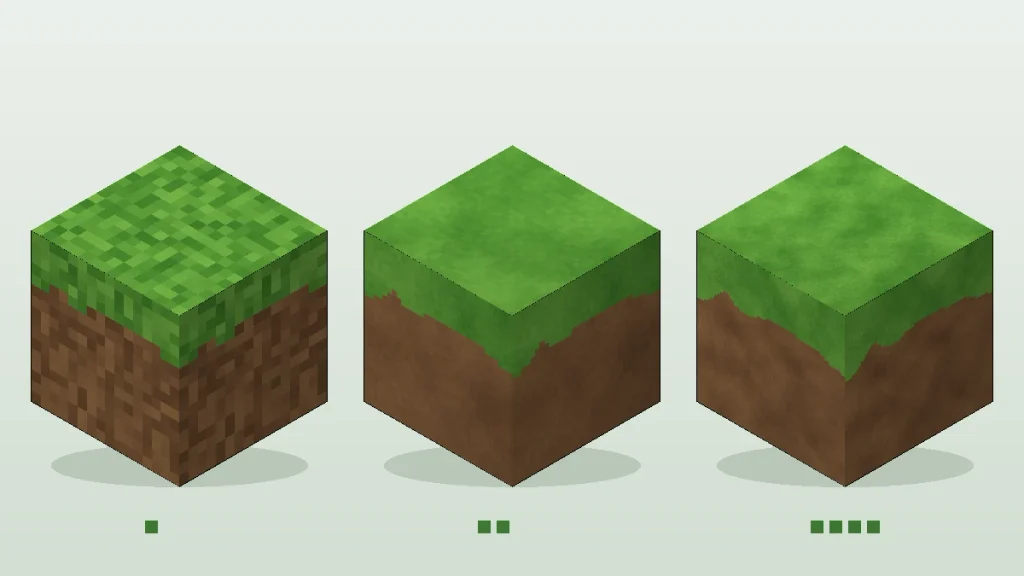
The number is the pixel width of each block face. Vanilla Minecraft is 16×16. A 32x pack packs four times as many pixels onto every face, and 64x packs sixteen times as many. More pixels means finer bark, stone cracks, and ore detail, but it also means more video memory and longer load times.
| Resolution | Look | Best For | Hardware Needed |
|---|---|---|---|
| 16x | Vanilla art style, cleaned up | Older laptops, survival players | Anything that runs vanilla |
| 32x | Sharper pixel art | Most players | Most modern laptops and desktops |
| 64x | Detailed, painterly | Builders, screenshots | A dedicated graphics card |
| 128x and up | Near-realistic | Cinematic builds and videos | High-end GPU plus extra RAM |
Most of the best Minecraft texture packs stay at 16x or 32x for exactly this reason. My rule of thumb: if vanilla already struggles to hold 60 FPS on your machine, stay at 16x.
The 10 Best Minecraft Texture Packs for Better Graphics
Every pack below is free unless noted, runs on Java Edition, and has an active download page. I’ve grouped them by what they do best.
1. Faithful 32x (Best Overall)
Faithful redraws every vanilla texture at double resolution while keeping the original colors and shapes. Your world still feels like Minecraft, just crisper, a bit like going from a 720p TV to 1080p. The team names its releases by month and already lists a 26.3 build on the official Faithful 32x Modrinth page. If you have a dedicated GPU, Faithful 64x is the next step up.
Best for: anyone who wants a straight upgrade without changing the art style.
2. Stay True (Best 16x Vanilla Refresh)
Stay True by haimcyfly keeps the default 16x resolution but fixes what makes vanilla look dated: the obvious grass grid, flat logs, and plain flowers. It adds random texture variants so big fields stop looking like wallpaper. Connected textures need OptiFine or the Fabric mod Continuity, but the base pack works without either.
Best for: builders who love the vanilla style but hate the repetition.
3. Bare Bones (Best for Low-End PCs)
Bare Bones by RobotPants makes the game look like Mojang’s official trailers, with flat, clean colors and almost no texture noise. Because it stays at 16x and simplifies everything, it’s one of the lightest packs you can run. Grab it from the Bare Bones Modrinth page and pick the build that matches your version.
Here’s a small thing most guides skip. If a pack doesn’t have a build for your exact version yet, Minecraft shows a “made for an older version” warning but usually loads it anyway. Any block added after that build simply shows its vanilla texture until the creator updates.
4. Fresh Animations (Best for Lifelike Mobs)
Fresh Animations by FreshLX doesn’t repaint anything. It re-animates mobs, so villagers gesture, cows swing their heads, and zombies stagger instead of sliding. It needs OptiFine’s Custom Entity Models, or the much lighter combo of Entity Model Features and Entity Texture Features on Fabric, Quilt, or Forge. Download it from the Fresh Animations Modrinth page, and add the Entity Culling mod if your frame rate dips around big mob farms.
Best for: stacking on top of any other pack in this list for extra immersion.
5. Mizuno’s 16 Craft (Best Cozy Fantasy Look)
Mizuno’s 16 Craft gives the game a warm, storybook medieval feel at 16x. Wood looks hand-carved, stone looks softer, and cottages suddenly look like something from a fantasy map. It’s a favorite among builders who make villages and castles.
6. Jicklus (Best Rustic Survival Pack)
Jicklus leans into earthy browns and muted greens. It makes a plain survival base feel lived-in, which suits log cabins and farms, and at 16x it’s easy on older hardware.
7. Clarity (Best Detailed Pixel Art)
Clarity is a 32x pack that keeps a pixel-art feel but adds a lot of detail and bright, saturated color. TechRadar includes it in its 2026 roundup of Minecraft texture packs, and it’s a strong pick if Faithful feels too plain for you.
8. Patrix (Best Realistic Pack)
Patrix is the go-to if you want rocks that look like rocks. The 32x version is free, while the higher resolutions sit behind the creator’s paid Patreon tiers. Pair it with a shader that supports PBR textures, or the realism falls flat under vanilla lighting.
9. Vanilla Tweaks (Best for Small, Custom Changes)
Vanilla Tweaks lets you build your own pack from dozens of small changes, like lower fire, a shorter shield, and cleaner glass. You tick the boxes and it generates one ZIP file. Put it above your main pack so its fixes win.
10. Dramatic Skys (Best Sky Add-On)
Dramatic Skys replaces the flat vanilla sky with HD clouds and sunsets, and it’s designed to sit on top of any other pack. Custom skies need OptiFine or a Fabric sky mod, so check the pack’s page for what it supports on your version.
Best Minecraft Texture Packs Compared
Here’s how the best Minecraft texture packs on this list stack up at a glance.
| Pack | Resolution | Style | Performance Hit |
|---|---|---|---|
| Faithful 32x | 32x | Vanilla HD | Low |
| Stay True | 16x | Vanilla refresh | Very low |
| Bare Bones | 16x | Trailer style | Very low |
| Fresh Animations | Models only | Mob animation | Medium with big mob farms |
| Mizuno’s 16 Craft | 16x | Cozy fantasy | Low |
| Jicklus | 16x | Rustic | Very low |
| Clarity | 32x | Detailed pixel art | Low |
| Patrix | 32x free, higher paid | Realistic | High at 128x and up |
| Vanilla Tweaks | 16x | Custom tweaks | Very low |
| Dramatic Skys | HD skies | Sky overhaul | Low |
Best Minecraft Texture Packs for Low-End PCs
The best Minecraft texture packs for an older laptop or a PC with integrated graphics are Bare Bones, Stay True, Jicklus, and Vanilla Tweaks. Faithful 32x usually runs fine on recent integrated graphics too. Skip 64x and higher packs entirely, because running out of video memory causes stutter that no settings tweak will fix.
Two free tweaks make a bigger difference than the pack itself. First, install Sodium (with Iris if you want shaders), which replaces OptiFine for most Fabric players and often gives a large frame-rate boost. Second, drop your render distance to 8 to 10 chunks. That alone can turn a choppy world into a smooth one.
How to Install Minecraft Texture Packs on Java Edition
Installing the best Minecraft texture packs takes about five minutes, and you don’t need any extra software.
- Download the ZIP. Get the build that matches your Minecraft version from Modrinth or CurseForge. Don’t unzip it. If you peek inside and see a pack.mcmeta file and an assets folder, it’s the right file.
- Open the pack folder. Launch Minecraft, then go to Options > Resource Packs > Open Pack Folder.
- Drop the ZIP in. Drag the file into the folder that opens.
- Turn it on. Back in the game, hover over the pack and click the arrow to move it to the Selected column, then click Done.
- Reload if needed. Press F3 + T in a world to reload resources without restarting.
If the folder button doesn’t open anything, paste the path for your system into File Explorer or Finder:
Pack Order Matters
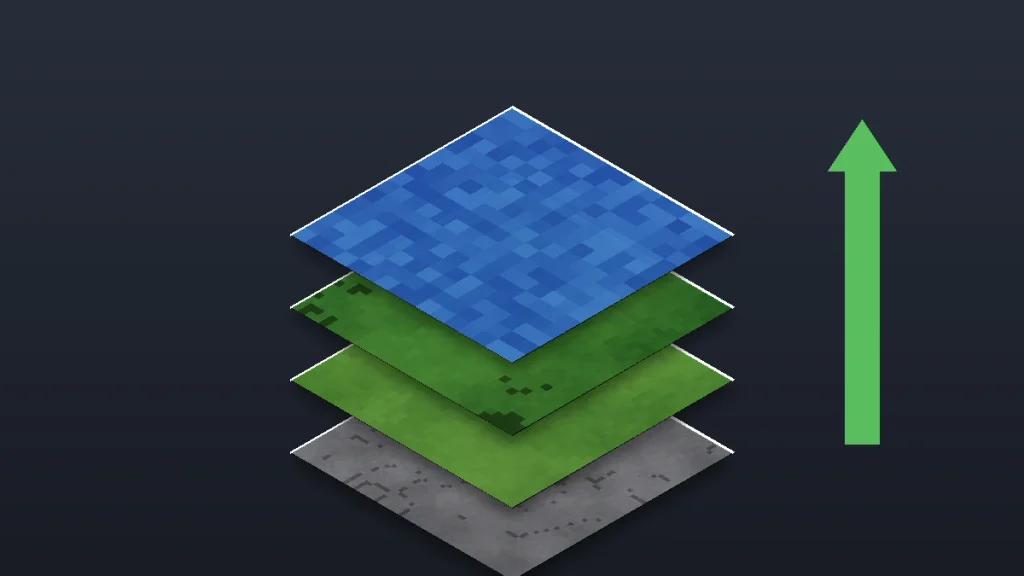
Minecraft reads the Selected list from top to bottom, and the pack on top wins whenever two packs change the same texture. Put add-ons like Fresh Animations, Vanilla Tweaks, and Dramatic Skys above your main pack. If something looks wrong, reordering fixes it nine times out of ten.
Give Minecraft More RAM for HD Packs
The official launcher gives Java Edition 2 GB of RAM by default, which is tight for 64x packs. Open the launcher, go to Installations, click the three dots next to your profile, choose Edit, then More Options. In the JVM Arguments box, change the first value from -Xmx2G to -Xmx4G:
Leave the rest of the line alone, and never give Minecraft more than half your computer’s total memory, or the game gets slower, not faster.
What About Bedrock Edition?
Bedrock (Windows, Xbox, PlayStation, Switch, iPhone, and Android) uses .mcpack files instead of ZIPs, and most packs on this list are Java-only. Faithful offers a separate Bedrock version, and console players can buy packs in the Minecraft Marketplace with Minecoins. Bedrock players should also turn on Vibrant Visuals in video settings, Mojang’s built-in lighting upgrade.
How to Download Texture Packs Safely
Even the best Minecraft texture packs get re-uploaded to shady mirror sites, and those fakes are the biggest risk, especially for kids searching on their own. Stick to Modrinth, CurseForge, Planet Minecraft, and the creator’s own page. A real pack is a .zip or .mcpack file, never an .exe or .jar. If an installer asks for admin rights, close it. The FTC’s guide on how to recognize, remove, and avoid malware is worth a two-minute read for any parent. New to the game? Start with our Minecraft for beginners guide.
Pick One Pack and Test It in a Creative World
The best Minecraft texture packs are the ones you actually enjoy, so don’t install five at once. Start with Faithful 32x if you have a decent PC or Bare Bones if you’re on an older laptop, load a creative world, and fly around for ten minutes. If it feels right, add Fresh Animations on top, then a shader. Want a world worth showing off? Try our best Minecraft house ideas for survival or learn how to build a modern house in Minecraft, then see how each one looks under your new textures.
Frequently Asked Questions
What is the best texture pack for Minecraft?
Faithful 32x is the best texture pack for most players because it doubles vanilla’s resolution without changing the art style, and it’s updated for every new version. If your computer is older, Bare Bones or Stay True look cleaner than vanilla at 16x with almost no performance cost. Realism fans should try Patrix.
Do texture packs lower FPS in Minecraft?
Some do. 16x packs run about the same as vanilla, and 32x packs cost very little on modern hardware. Packs at 64x, 128x, or higher use much more video memory and can cause stutter on laptops. Installing Sodium, lowering render distance, and giving Minecraft 4 GB of RAM helps HD packs run smoothly.
Are Minecraft texture packs safe to download?
Texture packs are safe when you download them from trusted sites like Modrinth, CurseForge, Planet Minecraft, or the creator’s own page. Modrinth scans uploads for malware. A real resource pack is a .zip or .mcpack file. Avoid any download that arrives as an .exe file or asks you to run an installer with admin rights.
Do texture packs work on Minecraft Bedrock Edition?
Yes, but Bedrock uses .mcpack files, and most popular packs are made for Java Edition only. Faithful has an official Bedrock version, and console players can buy packs in the Minecraft Marketplace. Fresh Animations has no Bedrock version. Bedrock players can also turn on Vibrant Visuals for better lighting without any download.
What is the difference between a texture pack and a shader?
A texture pack changes how blocks, items, and mobs look, like repainting every surface. A shader changes lighting, shadows, water reflections, and sky effects. They work together, so a 16x or 32x pack with a shader usually looks better than a high-resolution pack alone. Shaders on Java need Iris or OptiFine.
Do I need OptiFine for texture packs in 2026?
No. Basic texture packs work in vanilla Minecraft with no mods. Some extras, like connected textures, custom skies, and animated mobs, need OptiFine or lighter Fabric alternatives such as Continuity, Entity Model Features, and Entity Texture Features. Many players now use Sodium and Iris instead of OptiFine for better performance.