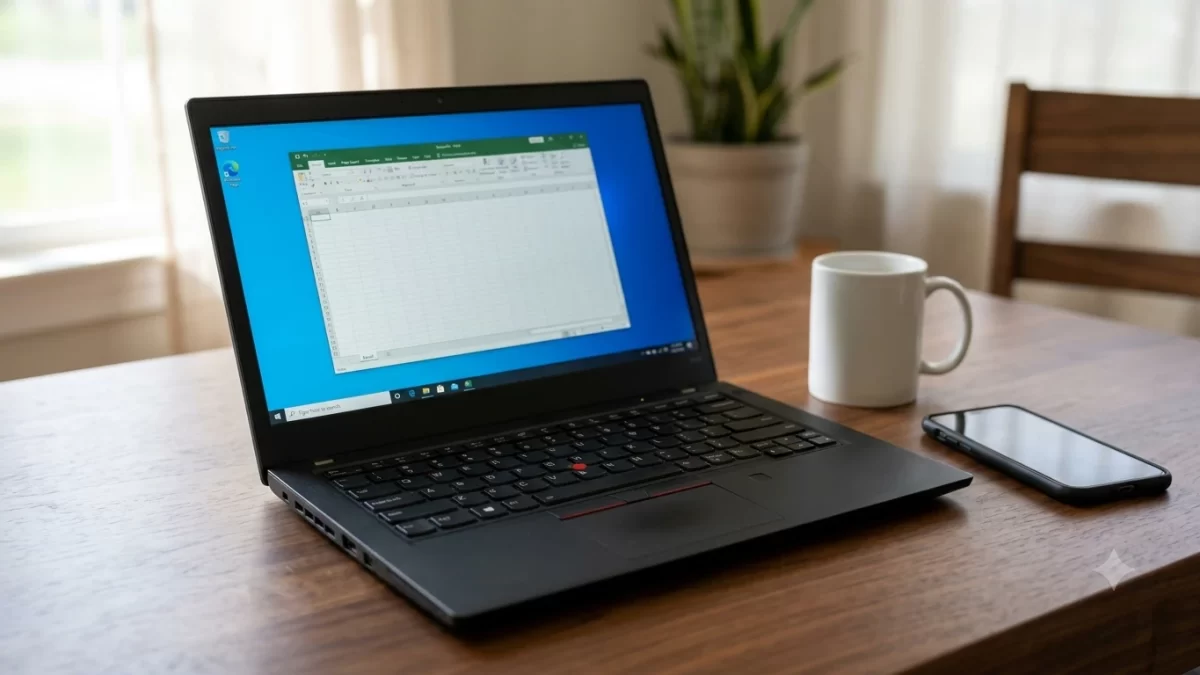
The Lenovo ThinkPad T14 Gen 7 is the easiest-to-repair mainstream ThinkPad Lenovo has made in years, with upgradeable RAM, a tool-free battery, and a keyboard you can swap yourself. The catch is speed and price. The base model performs about the same as last year’s T14 Gen 6 while costing more, so the smart buy is a mid or high configuration, or a discounted one.
I’ve used ThinkPad T-series laptops for work for a long time, and this ThinkPad T14 Gen 7 review pulls together hands-on impressions with lab results from Notebookcheck’s base-model review and its follow-up on a high-end unit. Here’s what you need to know before you spend $1,600 or more.
Key Takeaways
- The ThinkPad T14 Gen 7 brings back upgradeable memory (LPCAMM2 on Intel models) and makes the battery, keyboard, and SSD easy to replace.
- The base Intel Core Ultra 5 model is roughly as fast as the T14 Gen 6. Spend more for a Core Ultra 7 or an H-series chip.
- Skip the base 1920 x 1200 screen if you edit photos. The optional 2.8K OLED panel is excellent.
- Pricing starts around $1,600 on Lenovo.com, and resellers like CDW often list it for less.
- Best for: IT departments, remote workers, and anyone who keeps a laptop four years or longer.
ThinkPad T14 Gen 7 Specs at a Glance
Lenovo announced the ThinkPad T14 Gen 7 at MWC in March 2026. It comes in Intel and AMD versions, and the two are more different inside than the shared name suggests.
| Spec | Lenovo ThinkPad T14 Gen 7 (Intel) | ThinkPad T14 Gen 7 (AMD) |
|---|---|---|
| Processor | Intel Core Ultra Series 3 (Panther Lake), from Core Ultra 5 325 up to 16-core H-series chips | AMD Ryzen AI 7 PRO 450 and other Ryzen PRO options |
| Graphics | Intel Xe3 integrated; Arc B370/B390 on top CPUs | AMD Radeon 860M |
| Memory | LPCAMM2 LPDDR5X-6800, up to 64GB, upgradeable | Two SO-DIMM slots, DDR5-5600 |
| Display | 14-inch 1920 x 1200 IPS (touch optional) or 2.8K OLED, 120Hz | 14-inch 1920 x 1200 IPS, touch optional; other panels vary |
| Battery | 60Wh standard, 75Wh optional | Varies by configuration |
| Wireless | Wi-Fi 7, Bluetooth 5.4, optional 5G | Wi-Fi 7, Bluetooth 5.4 |
| Weight | From about 2.8 pounds | From about 2.8 pounds |
| Starting price | About $1,618 on Lenovo.com | About $1,775 to $1,850 at CDW |
Prices move constantly with Lenovo’s rolling sales, so treat these as ballpark figures as of November 2026.
Design and Build Quality
Lenovo redesigns its ThinkPads roughly every third generation, and this is one of those years. The ThinkPad T14 Gen 7 gets a new chassis that’s about 2 millimeters smaller in width and depth than the Gen 6, though it’s a hair thicker at just under an inch at its thickest point.
Spec listings put the starting weight at about 2.8 pounds. Notebookcheck’s Intel test unit came in heavier at roughly 3.2 pounds, so expect the number to climb with touchscreens and bigger batteries. It’s not an ultralight. If weight is your top concern, the slimmer ThinkPad T14s Gen 7 is the better fit.
The build feels like a ThinkPad should. There’s minimal flex in the deck, the hinge opens with one hand, and the ThinkPad T14 Gen 7 carries MIL-STD-810H durability testing. That’s the military test standard Lenovo uses for drops, temperature swings, and vibration. It doesn’t make the laptop indestructible, but in my experience T-series machines survive years of airport security bins and backpack abuse better than most consumer laptops.
Keyboard, TrackPoint, and Touchpad
This is still the main reason people buy a ThinkPad, and the ThinkPad T14 Gen 7 keyboard is one of the best you can get. The keys have 1.5 millimeters of travel, the feedback is crisp, and the backlit labels got a cleaner redesign this year. You can type for hours without fatigue.
The red TrackPoint and its three physical buttons are here, too. If you’ve never used one, give it a week. Many longtime users (me included) find it faster than reaching for the touchpad when working in spreadsheets.
One small warning: some low-end configurations ship without a backlit keyboard. Check that box when you order, because you’ll miss it the first time you work on a dim flight.
Display: Skip the Base Panel If You Can
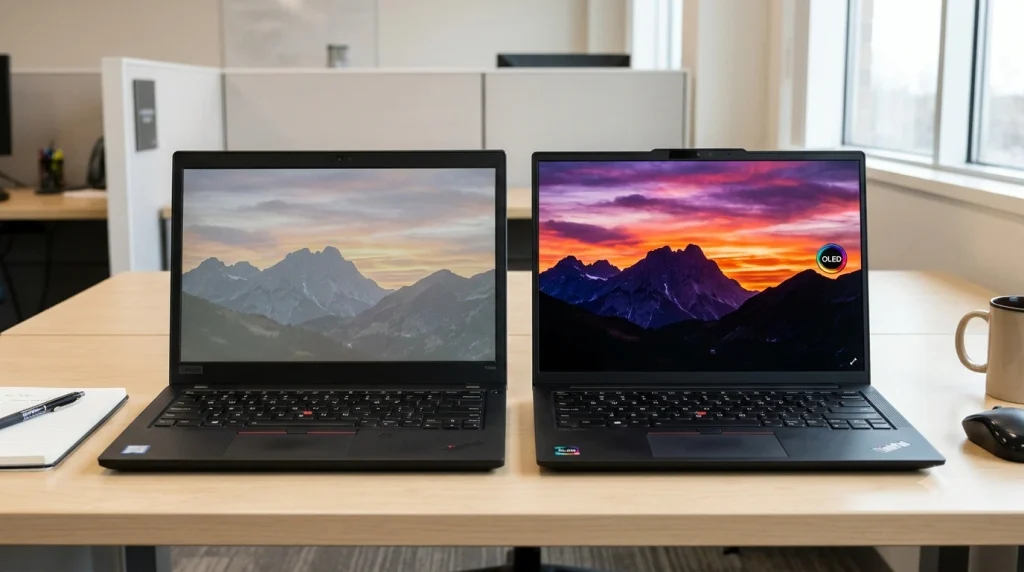
The base ThinkPad T14 Gen 7 screen is a 14-inch, 1920 x 1200 matte IPS panel at 60Hz. Brightness is fine at about 400 nits, and Notebookcheck measured no PWM flicker, which is good news for sensitive eyes. Color is the weak spot. It covers only about 60% of the sRGB color space, so photos look flat and it’s not suitable for color work.
For documents, email, and Teams calls, the base ThinkPad T14 Gen 7 panel is perfectly usable. But if you look at your screen eight hours a day, the upgrade pays off. The optional 2.8K (2880 x 1800) OLED is a different class of display:
- About 512 nits of average brightness in Notebookcheck’s testing
- Full sRGB and nearly full DCI-P3 coverage
- True blacks and a 120Hz refresh rate (set to 60Hz out of the box, so change it in Settings)
- One drawback: it uses PWM dimming at 600Hz, which a small number of users notice as eye strain
Performance: Choose Your Processor Carefully
Here’s where the ThinkPad T14 Gen 7 gets complicated. Intel’s Panther Lake chips are efficient, but the entry-level Core Ultra 5 325 doesn’t move the needle. In Notebookcheck’s Cinebench R23 multi-core test, the base Gen 7 scored 10,487, a bit lower than the Gen 6’s 10,946. Integrated graphics performance actually went backward on that model.
The high-end configuration tells a different story. With a 16-core Core Ultra 7 H-series chip, average performance jumped about 41% over the base model, and single-core speed rose around 10%. That’s the version for developers, data analysts, and anyone running heavy Excel models or local AI tools.
Which ThinkPad T14 Gen 7 configuration should you buy?
- Office work, email, browsing: Core Ultra 5 or Ultra 7 355, 16GB RAM, base screen.
- Power users and developers: Core Ultra 7 with 32GB RAM and the OLED panel.
- Corporate fleets: Core Ultra 7 365 for Intel vPro remote management.
- Value seekers: The AMD Ryzen AI 7 PRO model, which often sells for less with similar everyday speed.
Most configurations qualify as Copilot+ PCs. The Intel Core Ultra 7 355 is rated up to 49 TOPS of NPU performance and the AMD Ryzen AI 7 PRO 450 up to 50 TOPS, both above Microsoft’s 40 TOPS bar. You can check exactly which AI features need that hardware on Microsoft’s Windows 11 specifications page.
Two quirks to know about. Performance drops noticeably on battery (about 10% on the base model and more on the high-end unit), and the base 512GB SSD throttled under sustained load in testing. Neither matters for typical office work, but you’ll feel it during long exports or big file copies.
Repairability and Upgrades: The Real Headline
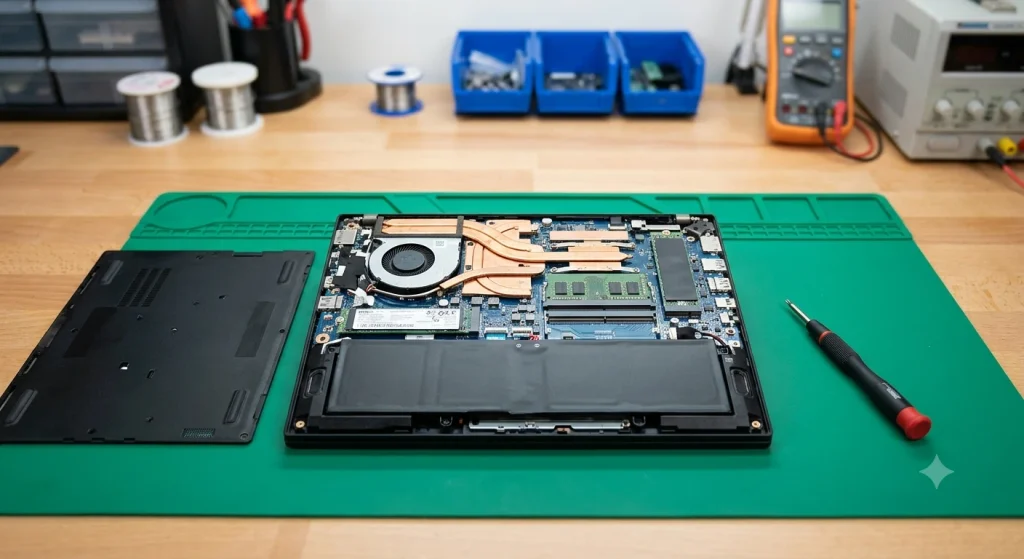
If you’re an IT manager or just someone who keeps laptops a long time, this is why the ThinkPad T14 Gen 7 stands out. Lenovo rebuilt the inside with repairs in mind:
- Upgradeable RAM: Intel models use a single LPCAMM2 module. You get fast LPDDR5X memory without soldering it to the board, and you can upgrade to 64GB later.
- Tool-free battery: It’s no longer screwed in. A release button frees it.
- Replaceable keyboard: A coffee spill no longer means replacing the whole top case.
- Modular USB-C ports: The charging ports are the parts that wear out first, and now they’re swappable.
- Storage: A standard M.2 2280 SSD slot, plus a second M.2 2242 slot for an optional 5G modem.
- Cleanable fan: You can clear dust without redoing the thermal paste.
According to Notebookcheck’s teardown, only the CPU and Wi-Fi card are soldered. For a mainstream business laptop in 2026, that’s rare. Pro tip: buy 16GB now if your budget is tight and add a larger LPCAMM2 module later when prices drop.
Ports and Connectivity
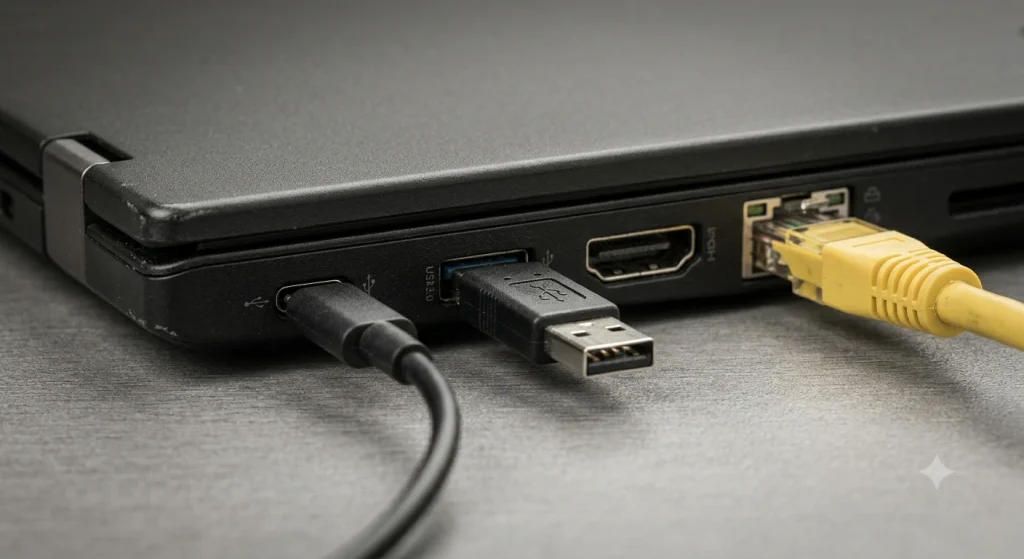
You won’t need a dongle for most setups. The ThinkPad T14 Gen 7 includes:
- 2 x USB4 / Thunderbolt 4 (40Gbps, charging and display out)
- 2 x USB-A (5Gbps)
- HDMI
- Gigabit Ethernet (RJ45)
- 3.5mm audio jack
- Optional smart card reader and nanoSIM slot for 5G
- Wi-Fi 7 and Bluetooth 5.4
On the ThinkPad T14 Gen 7, a full-size Ethernet jack is a gift if you work in hotels or older offices. The missing SD card reader is the one real gap, and photographers will want to budget for a small USB-C reader.
The ThinkPad T14 Gen 7 webcam is 5MP with an IR sensor for Windows Hello face login and a physical privacy shutter. Video quality is fine for Zoom but nothing special. The 2W stereo speakers are a clear step up from the Gen 6.
Battery Life
The standard ThinkPad T14 Gen 7 battery is 60Wh, with a 75Wh upgrade available when you customize your order. Spend the extra money on the bigger battery. Both of Notebookcheck’s units earned “long battery life” in their pros, and Stanford University’s IT department lists the 75Wh version at up to 20 hours, which is a manufacturer-style best-case figure.
In real life, expect a full workday of browsing, docs, and video calls on the base IPS model. The OLED panel and H-series chips will cut that, especially with bright white backgrounds. Turn on dark mode and keep the refresh rate at 60Hz when you’re unplugged for the longest runtime.
The ThinkPad T14 Gen 7 fan stays quiet during normal work, and both test units were described as cool and quiet. You won’t hear it in a library unless you’re compiling code or exporting video.
ThinkPad T14 Gen 7 vs T14 Gen 6 vs T14s Gen 7
| Model | Best for | Key difference |
|---|---|---|
| ThinkPad T14 Gen 7 | Long-term ownership, fleets | Upgradeable RAM, easy battery and keyboard swaps |
| ThinkPad T14 Gen 6 | Budget buyers | Similar base speed, often discounted now |
| ThinkPad T14s Gen 7 | Frequent travelers | About 2.4 pounds, but soldered RAM and harder repairs |
If you can find a T14 Gen 6 on clearance for several hundred dollars less, it’s a smart buy for basic office use. If you want a laptop that’s still serviceable in 2030, the ThinkPad T14 Gen 7 wins.
Pros and Cons
What we like
- Best-in-class repairability with upgradeable LPCAMM2 memory
- Excellent keyboard and TrackPoint
- Great port selection, including Ethernet
- Gorgeous optional OLED display
- Quiet, cool operation and long battery life
What we don’t
- Base model is barely faster than the Gen 6
- Base IPS screen has poor color coverage
- Pricier than its predecessor
- The 75Wh battery and backlit keyboard aren’t always standard
Is the Lenovo ThinkPad T14 Gen 7 Worth It?
Yes, if you buy the right version. The Lenovo ThinkPad T14 Gen 7 isn’t a big performance leap, but it’s the most practical, fixable T14 in years. Notebookcheck scored both of its review units 89%, while How-To Geek gave it a more cautious 75%, mostly over value.
My recommendation: get a Core Ultra 7 or Ryzen AI 7 PRO model with 16GB or 32GB of RAM, add the 75Wh battery, and wait for one of Lenovo’s frequent sales. Check the official Lenovo US store and business resellers like CDW side by side, since the same configuration can differ by $300 or more.
Before you set up your new laptop, bookmark our guide on what to do if your laptop turns on but the screen is black. Developers can also follow our walkthrough on how to install Python on Windows 11 and grab one of the best free code editors for a fresh machine.
Frequently Asked Questions
When was the Lenovo ThinkPad T14 Gen 7 released?
Lenovo announced the ThinkPad T14 Gen 7 at Mobile World Congress in March 2026, and models started shipping in the US over the following months. It comes in Intel Core Ultra Series 3 (Panther Lake) and AMD Ryzen AI PRO versions, with configurations sold through Lenovo.com and business resellers like CDW.
Can you upgrade the RAM in the ThinkPad T14 Gen 7?
Yes. Intel models use a single LPCAMM2 memory module that you can replace or upgrade to 64GB, instead of soldered RAM. AMD models use two standard SO-DIMM DDR5 slots. Either way, you can start with 16GB and add more later, which is rare for a modern 14-inch business laptop.
How much does the ThinkPad T14 Gen 7 cost?
The ThinkPad T14 Gen 7 starts at roughly $1,600 on Lenovo.com for an Intel Core Ultra 5 model. Popular Core Ultra 7 and Ryzen AI 7 PRO configurations sell for about $1,800 to $2,200 at resellers, while fully loaded OLED models can top $3,500. Lenovo runs frequent sales, so prices change often.
Is the ThinkPad T14 Gen 7 good for programming?
Yes, especially with a Core Ultra 7 H-series chip and 32GB of RAM. You get a top-tier keyboard, a 16:10 screen that fits more code, plenty of ports, and upgradeable memory for growing workloads. The base Core Ultra 5 model handles web development fine but feels slower for large builds.
What is the difference between the ThinkPad T14 and T14s Gen 7?
The T14s Gen 7 is thinner and lighter at about 2.4 pounds, aimed at frequent travelers. The standard T14 Gen 7 is heavier but far easier to repair, with upgradeable RAM, a tool-free battery, and a replaceable keyboard. The T14s uses soldered memory, so pick your RAM carefully at purchase.
Does the ThinkPad T14 Gen 7 have Thunderbolt?
Yes. The ThinkPad T14 Gen 7 has two USB4 ports rated at 40Gbps with Thunderbolt 4 support. Both handle charging, external monitors, and docking stations. You also get two USB-A ports, HDMI, and Gigabit Ethernet, so most users won’t need a dongle for everyday office setups.