If you want to check credit card balance online, the good news is that it takes about a minute. Every major card issuer in the US lets you log in on its website or app and see what you owe, what you can still spend, and when your next payment is due. The harder part is knowing which number to look at, because your account page usually shows several balances at once.
That’s where a lot of people get tripped up. They see one figure in the app, a different one on their statement, and wonder which is right. Both usually are. This guide walks you through how to find your balance, what each number on the screen actually means, and a few habits that keep surprises off your bill. It’s general information, not financial advice, so always check your own card agreement for the details that apply to you.
The Numbers You’ll See on Your Account Page
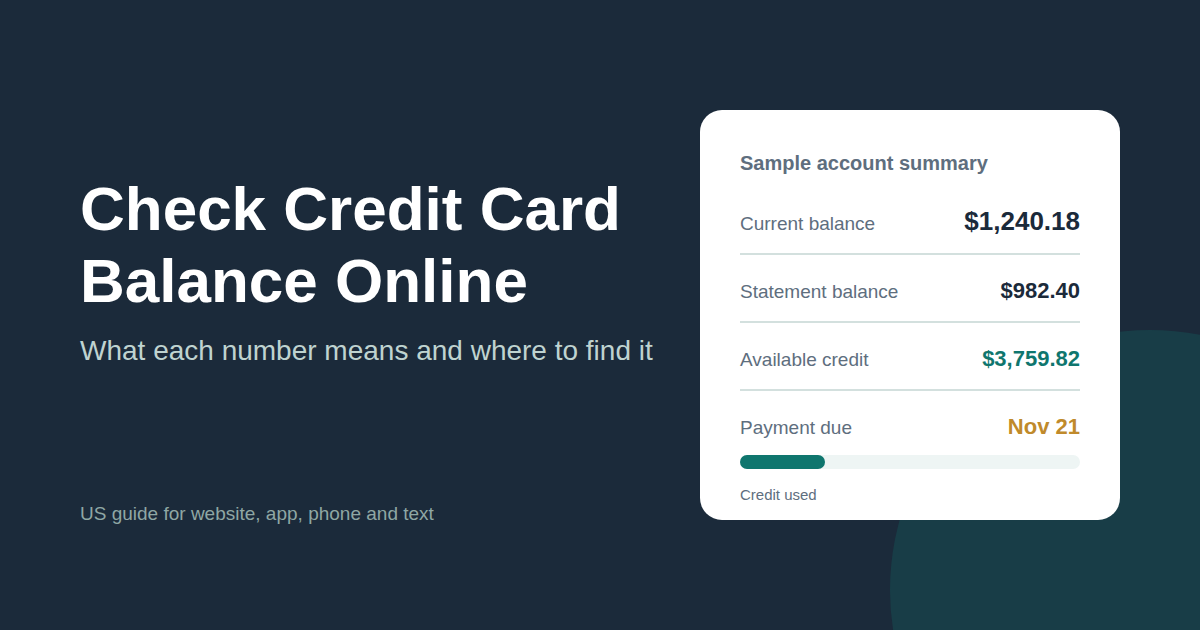
When you log in, your issuer typically shows a short account summary. These are the figures that matter most:

Practical tip: Don’t treat available credit as “money you have.” It’s simply your limit minus what you owe, and it goes down every time you swipe. It goes back up as your payments post. If you’re planning a big purchase, check available credit first so the charge doesn’t get declined at the register.
Statement Balance vs Current Balance: Why They Don’t Match
Your statement balance is a snapshot. It shows what you owed on the day your billing cycle ended, and it doesn’t change after that statement is generated. Your current balance is a live number. It starts from your latest statement balance and then adds every purchase and subtracts every payment made since.

So if you bought groceries yesterday, your current balance will be higher than your statement balance. If you made a payment after the cycle closed and haven’t used the card since, your current balance will be lower. When you log in to your card account online or open the issuer’s app, the current balance is usually the one shown most prominently. That’s why the app number often doesn’t match the bill in your inbox.
The difference matters when you pay. Paying the full statement balance by the due date keeps your card’s grace period, which means you won’t be charged interest on new purchases. Paying the current balance brings the card down to zero, which can be handy if you want to free up credit before a large purchase. One more detail: issuers generally report your balance to the credit bureaus about once a month, usually shortly after a billing cycle ends.
How to Check Your Credit Card Balance on a Computer
If you’ve never logged in before, set aside a few extra minutes the first time to create your online access.
- Open your browser and type your card issuer’s web address yourself, using the address printed on your statement or on the issuer’s official materials. Avoid clicking links in unexpected texts or emails.
- Click Sign In or Log In. If it’s your first visit, look for an option like “Set up online access” or “Enroll” and follow the prompts. You’ll usually need your card number and some personal details to verify it’s you.
- Enter your username and password, then complete any verification step, such as a one time code sent to your phone.
- Find your credit card on the dashboard. Many issuers show the balance right on the home page; others need you to click the card for details.
- Click into the account to see your statement balance, available credit, minimum payment, due date, and recent transactions.
- Open the Statements section if you want to download past monthly statements as PDFs.
Once you know where everything sits, checking your balance takes seconds.
Checking Your Balance in Your Card Issuer’s App
On a phone, the issuer’s own app is the quickest option. Most apps put your current balance on the home screen as soon as you sign in. You can usually also set up alerts, schedule payments, and review transactions from the same place. Many apps let you sign in with Face ID or a fingerprint after the first login, so you don’t have to type your password every time.
- Download your issuer’s official app from the Apple App Store or Google Play. Check that the listing is published by your bank or card company, not a third party with a similar name.
- Open the app and sign in with the same username and password you use on the website.
- Complete any security check, such as a code sent by text.
- Look at the home screen for your current balance, then tap the card for the full breakdown.
- While you’re there, go into settings or alerts and turn on balance or payment due notifications.

No Internet? Two Backup Ways to Get Your Balance
Online isn’t the only option. Every card has a customer service number on the back, and calling it usually gets you an automated system that can read out your balance after you verify your identity. It’s slower than the app, but it works on any phone.
Some issuers also offer balance checks by text message once you’ve enrolled online. Capital One, for example, lets cardholders who’ve set up text alerts text “bal” to 227898. Text options and keywords vary by issuer, so check your own card company’s website before relying on one.

Why It Pays to Check Your Balance Often
Looking at your balance once a month when the bill arrives is better than nothing. Checking it every week or so gives you a lot more control.
- Fewer surprise bills: you see your spending add up in real time instead of all at once.
- Faster fraud detection: an unfamiliar charge stands out quickly when you’re used to your own activity.
- No declined cards: you’ll know how much available credit you have before a big purchase.
- Easier on time payments: the due date and minimum payment sit right next to your balance.
- Clearer payoff decisions: you can compare statement and current balances before choosing how much to pay.
Your monthly statement is still worth reading, too. In the US, card issuers are required to show your payment due date, ending balance, and minimum payment due together on your periodic statement, along with a warning about how long payoff takes if you only pay the minimum.
On safety: logging in through your issuer’s official website or app is the safest way to check. Be wary of texts or emails that say there’s a problem with your card and include a login link. If something looks off, close it and call the number on the back of your card instead. Your account security also depends on you: use a strong, unique password and never share your one time codes with anyone who contacts you.
Frequently Asked Questions
How do I check my credit card balance online?
Sign in to your card issuer’s website or official app, then select your credit card from the dashboard. Your current balance usually appears right away, with your statement balance, available credit, and due date one tap or click away. If it’s your first time, you’ll need to set up online access with your card details.
Why is my current balance different from my statement balance?
Your statement balance is fixed at the end of your billing cycle, while your current balance keeps updating with new purchases and payments. If you’ve used the card since your statement closed, your current balance will be higher. If you’ve made a payment since then, it may be lower.
Which balance should I pay, statement or current?
Paying your full statement balance by the due date keeps your grace period, so you won’t pay interest on new purchases. Paying the current balance clears everything you owe as of that moment. Check your card agreement for how your specific card handles interest.
What is available credit on a credit card?
Available credit is the amount you can still spend before reaching your credit limit. It drops as you make purchases and rises again as your payments are processed.
Can I check my credit card balance without logging in online?
Yes. You can call the customer service number on the back of your card and use the automated system to hear your balance. Some issuers also offer text balance checks after you enroll on their website.
Does checking my credit card balance affect my credit score?
No. Viewing your balance in your own account is just looking at your account information. What can affect your score is the balance your issuer reports to the credit bureaus, which generally happens about once a month after your billing cycle ends.
Conclusion
Checking your credit card balance online is quick once you’ve set up access. Sign in on your issuer’s website or app, find your card, and look at the summary. The key is reading it correctly: the current balance is what you owe today, the statement balance is what your last bill says, and available credit is what you can still spend.
Make it a habit rather than a monthly chore. Turn on balance alerts, glance at your transactions every week or so, and always log in through official channels. You’ll catch mistakes and suspicious charges early, and you’ll always know where you stand before the bill shows up.