Fortnite for beginners comes down to three things: pick the right mode, land somewhere quiet, and stay ahead of the storm. The game is free to download on PC, PlayStation, Xbox, Nintendo Switch, iPhone, and Android, and you can play your first match in about 10 minutes. Most new players struggle because they jump into the hardest mode first and land where everyone else lands.
This guide walks you through setup, the main game modes, how a match actually works, loot, building, V-Bucks, and the habits that will get you from “first one eliminated” to the final circle.
Key Takeaways
- Fortnite is free on every major platform. You only pay for cosmetics, which never affect gameplay.
- Start in Zero Build. It removes building so you can learn shooting, looting, and movement first.
- Land away from the crowd. Quiet edges of the map give you time to loot and survive the opening minutes.
- Watch the storm timer. More beginners lose to the storm than to other players.
- The Battle Pass pays for itself. Finish one and you earn back enough V-Bucks to buy the next.
What Is Fortnite and Is It Free?
Fortnite is an online game from Epic Games, a company based in Cary, North Carolina. Its most famous mode is Battle Royale: up to 100 players drop onto an island, grab weapons, and fight until one player or team is left standing. A shrinking storm keeps pushing everyone closer together.
Yes, Fortnite is free. You don’t need to buy anything to play every core mode. Epic makes money from cosmetics like outfits, emotes, and pickaxe skins, which change how you look but never give you an advantage. That’s the single best thing about the game for beginners. Nobody can buy a better gun than you.
The ESRB rates Fortnite T for Teen for cartoon-style violence. There’s no blood, and eliminated players simply teleport out. If you’re a parent setting it up for a younger kid, see the parental controls section below.
How to Download Fortnite and Set Up Your Account
Here’s how to get Fortnite running on each platform:
- PlayStation 5 and PS4: Search “Fortnite” in the PlayStation Store. No PlayStation Plus subscription is needed to play online.
- Xbox Series X|S and Xbox One: Download it from the Microsoft Store. Like PlayStation, you can play online without a paid Game Pass membership.
- Nintendo Switch and Switch 2: Grab it free from the Nintendo eShop.
- PC: Install the Epic Games Launcher from the official site, then download Fortnite inside it.
- iPhone and iPad: Fortnite returned to the US App Store in May 2025 after a five-year legal fight between Epic and Apple.
- Android: Download through the Google Play Store or the Epic Games Store app.
On first launch, you’ll create or link an Epic Games account. Do this even if you only play on one console. Your account carries your progress, friends, and purchases across every device, so you can start a match on PlayStation and pick up your Battle Pass progress on your phone later. Turn on two-factor authentication while you’re there. Fortnite accounts with rare skins are a common target for hackers.
Fortnite Game Modes Explained
Fortnite isn’t one game anymore. The lobby holds several modes, and picking the right one matters a lot when you’re new.
| Mode | What It Is | Good for Beginners? |
|---|---|---|
| Battle Royale (Build) | Classic 100-player mode where you can build walls, ramps, and floors | Hard. Experienced players build fast. |
| Zero Build | The same Battle Royale with building turned off | Yes. The best place to start. |
| Reload | Smaller map, faster matches, respawns while a teammate is alive | Yes. Great for practice reps. |
| LEGO Fortnite | Survival and crafting game, similar in feel to Minecraft | Yes. Relaxed, no pressure. |
| Fortnite Festival | Rhythm game where you play along to real songs | Yes. No combat at all. |
| Creative and Discover | Thousands of player-made maps, from obstacle courses to aim trainers | Yes. Ideal for practicing aim. |
Modes rotate. Epic retired Rocket Racing and Ballistic in 2026, and limited-time modes come and go each season, so check the Discover tab when you log in.
Fortnite Zero Build vs. Build Mode
My honest advice: play Fortnite Zero Build for your first two to three weeks. In regular Battle Royale, a veteran can throw up four walls and a ramp in under a second, and you’ll get eliminated before you understand why. Zero Build takes that skill gap away. You’ll learn the map, the weapons, and how fights flow, which is most of the game anyway. Switch to Build once you’re regularly reaching the top 25.
How to Play Fortnite: How a Match Works
Every Battle Royale match follows the same pattern, and understanding it is the fastest way to improve.
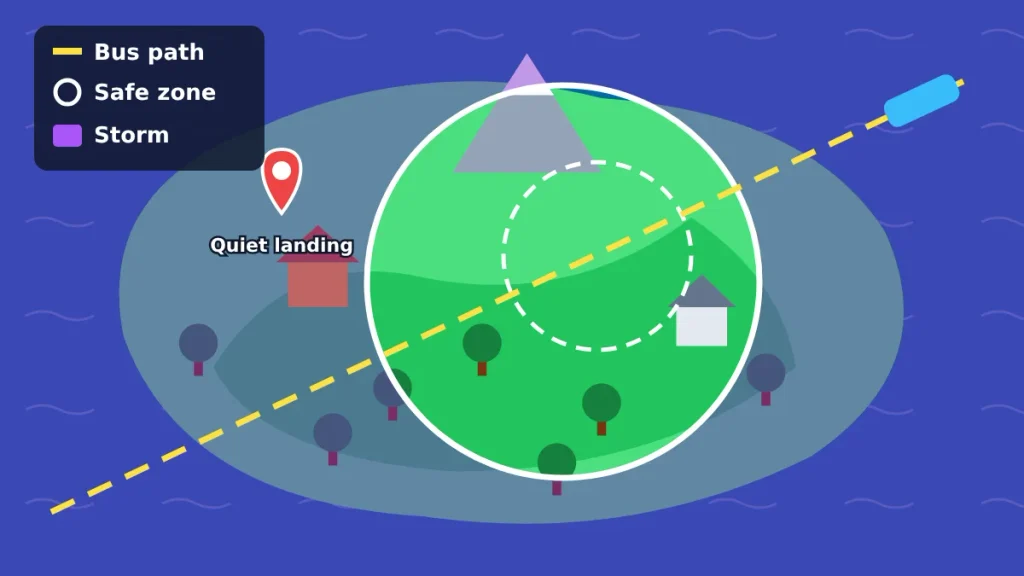
- The Battle Bus. Everyone starts on a flying bus that crosses the island. Press the jump button when you’re above where you want to land.
- The drop. You skydive, then your glider opens automatically near the ground. Point straight down to fall faster.
- Looting. You land with only a pickaxe. Open chests, grab floor loot, and search buildings for weapons, ammo, and healing.
- The storm. After a few minutes, a storm closes in and shrinks the safe zone in stages. Standing in it drains your health.
- The endgame. The final circles are tiny. Whoever survives last wins the Victory Royale.
You have 100 health and can add up to 100 shield on top, for 200 total. Shield always takes damage first, so drink shields before a fight, not during one. If your squadmate gets knocked down, you can revive them. If they’re fully eliminated, grab their Reboot Card and take it to a Reboot Van to bring them back.
Weapons, Loot, and Rarity Colors
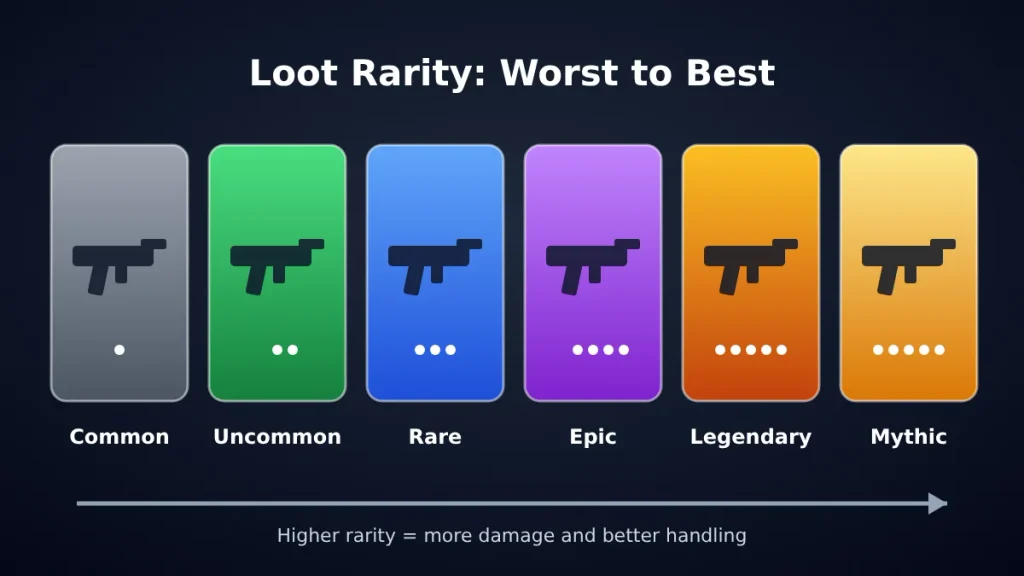
Every weapon and item has a color that tells you how good it is. Learn these on day one:
- Gray (Common) and Green (Uncommon): usable early, replace them when you can
- Blue (Rare): solid for most of the match
- Purple (Epic): strong, worth fighting for
- Gold (Legendary): top tier for standard weapons
- Mythic and Exotic: special items, often tied to bosses or vending machines
The exact weapon pool changes every season, but a balanced loadout almost always looks like this: an assault rifle for mid-range, a shotgun for close fights, an SMG or pistol as backup, and two slots for healing. You have five inventory slots, so don’t fill them with three guns of the same type.
Fortnite Tips for Beginners That Actually Work
These are the habits that separate players who die in the first two minutes from players who make it to the final circles.
Before the Match
- Turn on visual sound effects. Go to Settings, then Audio, and enable “Visualize Sound Effects.” It shows footsteps, chests, and gunfire as icons on your screen, which helps even if you’re wearing headphones.
- Use headphones. Footstep audio tells you where enemies are long before you see them.
- Lower your look sensitivity if you overshoot. Most new controller players have it set too high. Small changes help.
- Warm up in Creative. Five minutes in a free aim-training map beats jumping in cold.
During the Match
- Land at the edges. Skip named locations directly under the bus path. A lone farmhouse gives you time to loot in peace.
- Rotate early. Start moving toward the next safe zone when the timer shows about 30 seconds left, not when the storm is already on you.
- Use cover, always. Never stand in an open field. Trees, rocks, and buildings stop bullets in Zero Build.
- Don’t chase every fight. Hearing a battle nearby? Let two other players weaken each other, then decide.
- Heal behind cover, then push. Fighting at half health is how most beginners lose.
- Crouch to move quietly. Footsteps are much harder to hear when you crouch-walk.
After the Match
- Watch your replay. On PC and consoles, the Replays section under the Career tab lets you rewatch recent matches. Seeing where your opponent shot from teaches more than any guide.
- Play with friends. Duos and squads are more forgiving because teammates can revive you.
One more thing nobody tells new players: your first matches often include bots. Fortnite uses skill-based matchmaking, so early lobbies are easier on purpose. Enjoy the easy wins, but expect real players to show up as you improve.
V-Bucks, the Battle Pass, and What to Spend Money On
V-Bucks are Fortnite’s in-game currency. After Epic’s price change on March 19, 2026, $8.99 buys 800 V-Bucks in the US, and larger packs cost $22.99, $36.99, and $89.99. You can also find V-Bucks gift cards at Target, Walmart, Best Buy, and most grocery store checkouts.
If you spend anything, spend it on the Battle Pass. It costs 800 V-Bucks and pays out 800 V-Bucks if you complete it, along with dozens of outfits and items. Finish one pass and the next one is effectively free. You level it up just by playing and doing weekly quests.
Fortnite Crew is the monthly subscription ($11.99 per month). It includes the Battle Pass, a monthly outfit, 800 V-Bucks, and access to the other seasonal passes. It’s worth it only if you play several times a week. For casual players, the regular Battle Pass is the better deal.
Skip third-party sites promising “free V-Bucks.” They’re scams designed to steal your Epic account. The only real ways to get V-Bucks are buying them, earning them through the Battle Pass, or redeeming an official gift card.
Fortnite Parental Controls for Families
If your child is under 13, Epic requires parental permission before they can use voice chat, text chat, or make purchases. You’ll get an email to approve the account. From the Epic Games parental controls page, you can set spending limits, filter mature language, limit who can send friend requests, and get weekly playtime reports.
Set these up on both the Epic account and the console itself. Console-level controls let you require a PIN for purchases, which closes the loophole of a kid buying V-Bucks through the PlayStation or Xbox store. Our guide on how to set up parental controls on Xbox walks through the console side step by step.
Frequently Asked Questions About Fortnite for Beginners
Is Fortnite free to play?
Yes, Fortnite is completely free to download and play on PC, PlayStation, Xbox, Nintendo Switch, iPhone, and Android. You don’t need PlayStation Plus or Xbox Game Pass to play online. Epic Games earns money from optional cosmetics like outfits and emotes, which change your look but never give a gameplay advantage.
What is the easiest Fortnite mode for beginners?
Zero Build is the easiest Fortnite mode for beginners. It plays like regular Battle Royale but removes building, so you can focus on aiming, looting, and learning the map. Reload is another good option because matches are shorter and you can respawn while a teammate is still alive.
How do you get better at Fortnite fast?
Land away from crowded locations, turn on visual sound effects, and always play near cover. Practice aim for a few minutes in a Creative aim-training map before matches. Rotate toward the safe zone early instead of waiting for the storm. Reviewing your replays shows exactly where fights went wrong and speeds up improvement.
Is Fortnite OK for kids?
The ESRB rates Fortnite T for Teen because of cartoon violence, though there’s no blood or gore. The bigger concerns for younger kids are voice chat with strangers and in-game spending. Epic requires parental permission for players under 13, and parents can set chat filters, spending limits, and playtime reports.
How much does the Fortnite Battle Pass cost?
The Fortnite Battle Pass costs 800 V-Bucks, which is $8.99 in the US. Completing the pass returns 800 V-Bucks, so you can buy the next season’s pass without spending more money. Fortnite Crew, at $11.99 a month, includes the Battle Pass plus a monthly outfit and 800 V-Bucks.
Can you play Fortnite with friends on different consoles?
Yes. Fortnite supports cross-play across PC, PlayStation, Xbox, Nintendo Switch, and mobile. Add friends through their Epic Games username, then invite them to your party from the lobby. Your progress and purchases also follow your Epic account, so you can switch devices without losing anything you’ve earned.
Your Next Step: Play Five Zero Build Matches Tonight
Don’t try to master everything at once. Download Fortnite, link your Epic account, turn on visual sound effects, and play five Zero Build matches where your only goal is to land somewhere quiet and survive longer each time. That’s it. Once you’re reaching the top 25 regularly, start mixing in Build mode and learning a few basic structures.
For the latest season updates, patch notes, and system requirements, check the official Fortnite website. And if your family is looking for a calmer game to play together, our Minecraft for beginners guide is a great place to start.