In the Microsoft 365 vs Google Workspace debate, there’s no single winner, but there is a clear answer for most teams. Pick Microsoft 365 if your business runs on desktop Excel, Word files from clients, or Windows PCs you need to manage. Pick Google Workspace if your team works in a browser and edits documents together all day. Prices are now nearly identical, so the decision comes down to how your people actually work.
Key Takeaways
- After Microsoft’s July 1, 2026 price increase, both suites cost $7, $14, and $22 per user per month on annual plans.
- Microsoft 365 wins for desktop Office apps, advanced Excel work, and device security on Business Premium.
- Google Workspace wins for real-time collaboration, simplicity, and storage on its Standard and Plus plans.
- Google bundles Gemini AI into its plans, while Microsoft’s full Copilot is a $21 per user add-on.
- Both offer free trials, so test your real files for two weeks before you commit.
Microsoft 365 vs Google Workspace at a Glance
Both suites give you business email on your own domain, cloud storage, video meetings, calendars, and office apps. The difference is philosophy. Microsoft started with powerful desktop software and moved it to the cloud. Google started in the browser and has stayed there.
| Feature | Microsoft 365 | Google Workspace |
|---|---|---|
| Entry price (annual) | $7/user/month (Business Basic) | $7/user/month (Business Starter) |
| Outlook / Exchange | Gmail | |
| Office apps | Word, Excel, PowerPoint (desktop on Standard and up) | Docs, Sheets, Slides (browser based) |
| Cloud storage | 1 TB per user on every business plan | 30 GB to 5 TB per user, pooled |
| Video meetings | Teams, up to 300 attendees | Meet, 100 to 500 participants by plan |
| Built-in AI | Copilot Chat included, full Copilot is a paid add-on | Gemini included in Business plans |
| User limit on business plans | 300 | 300 |
Microsoft 365 vs Google Workspace Pricing in 2026
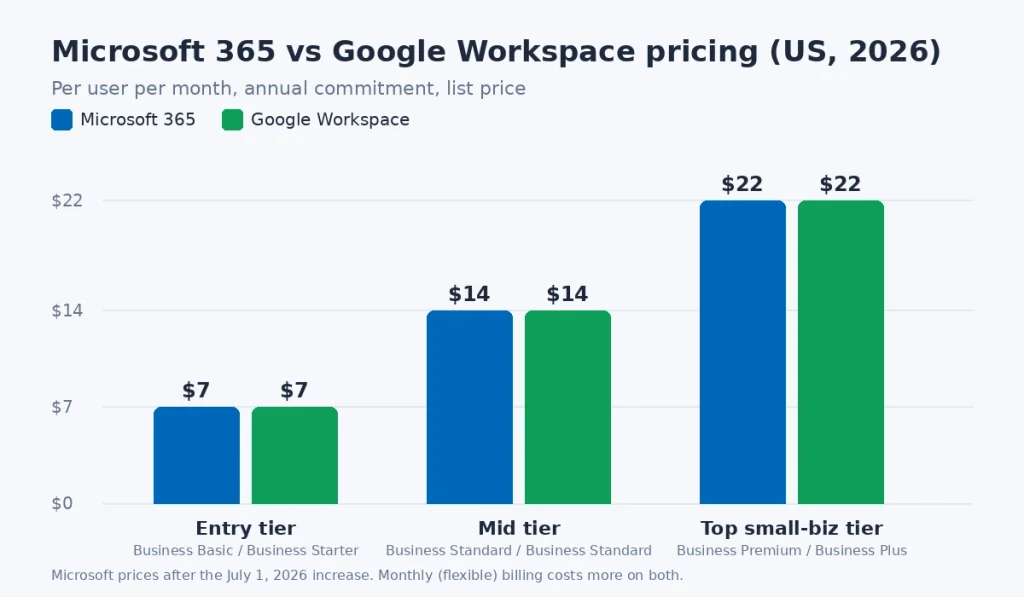
Here’s the surprise for anyone who compared these two a few years ago: the sticker prices now match almost exactly. Microsoft raised its US list prices on July 1, 2026, moving Business Basic from $6 to $7 and Business Standard from $12.50 to $14, while Business Premium stayed at $22, according to Microsoft’s official plan comparison page.
Google lists Business Starter at $7, Business Standard at $14, and Business Plus at $22 per user per month with a one-year commitment on its Google Workspace pricing page. Go month to month and Google charges 20% more ($8.40, $16.80, and $26.40). Microsoft also charges extra for month-to-month or monthly-billed plans.
| Tier | Microsoft 365 | Google Workspace |
|---|---|---|
| Entry | Business Basic: $7 | Business Starter: $7 |
| Middle | Business Standard: $14 | Business Standard: $14 |
| Top small-business tier | Business Premium: $22 | Business Plus: $22 |
For a 10-person office on annual billing, that’s $840, $1,680, or $2,640 a year on either side. So stop shopping on price. Shop on what each dollar buys.
What the entry plans leave out
Microsoft’s Business Basic doesn’t include installable desktop apps. You get the web and mobile versions of Word, Excel, and PowerPoint, plus email, Teams, and 1 TB of OneDrive storage. If anyone on your team needs the full desktop Excel, budget for Business Standard.
Google’s Business Starter is tighter on storage. Each user gets 30 GB pooled across Gmail and Drive, and Meet caps out at 100 participants with no recording. A team that shares video files or big design assets will hit that ceiling within months.
Apps and Everyday Productivity
This is where most teams should make their decision. Both suites handle letters, budgets, and slide decks fine. The gap shows up at the edges.
Where Microsoft 365 is stronger
- Excel power users. Pivot tables on large datasets, Power Query, complex macros, and financial models still run better in desktop Excel than in Google Sheets. Plenty of accountants simply won’t give it up.
- File compatibility. If clients, lenders, or government agencies send you .docx and .xlsx files with tracked changes and detailed formatting, Word and Excel open them exactly as intended.
- Offline work. Desktop apps on Business Standard and Premium work on a plane or at a job site with no signal.
Where Google Workspace is stronger
- Real-time collaboration. Five people can edit one Google Doc at the same time with almost no lag. Microsoft has caught up a lot, but Google still feels quicker and simpler here.
- Zero installs. Everything runs in Chrome or any modern browser, which makes onboarding a new hire a 10-minute job.
- Gmail. Search, spam filtering, and the clean interface are why plenty of small business owners choose Google before anything else.
Storage, Email, and Video Meetings
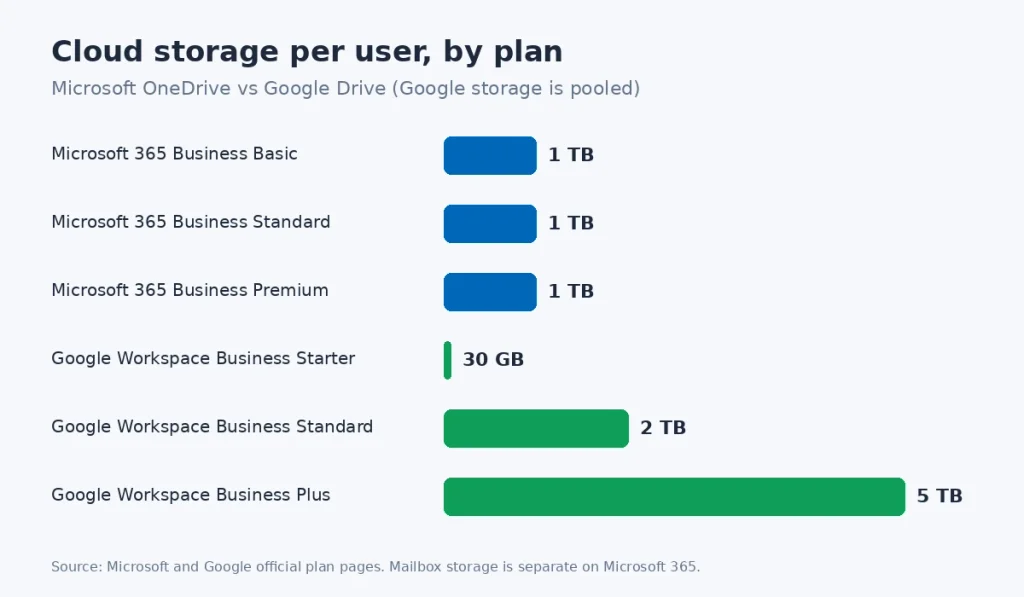
Microsoft gives every user on Business Basic, Standard, and Premium 1 TB of OneDrive storage, and email lives in a separate mailbox. Microsoft also announced an extra 50 GB of mailbox storage for Basic and Standard as part of its 2026 update. That separation matters: a heavy Outlook user won’t eat into file storage.
Google pools storage across the whole organization. Starter gives 30 GB per user, Standard gives 2 TB, and Plus gives 5 TB. Pooling is handy because a light user’s unused space covers a heavy user, but Gmail, Drive, and Photos all draw from the same bucket.
For meetings, Teams supports up to 300 attendees on all three Microsoft business plans and doubles as a full chat app. Google Meet scales from 100 participants on Starter to 150 on Standard and 500 on Plus, and recording starts at Standard. If your company already chats in Slack, Meet’s lighter footprint can be a plus.
AI Features: Copilot vs Gemini
This is the biggest difference in 2026, and it changes the real price. Google bundles Gemini into its Business plans. Starter gets Gemini in Gmail and the Gemini app, while Standard and Plus add Gemini inside Docs, Meet, and other apps at no extra charge.
Microsoft includes Copilot Chat with its business plans, but the version that works inside your Word documents, Excel files, and Teams meetings is Microsoft 365 Copilot Business, a separate add-on that lists at $21 per user per month for companies with up to 300 users. Add it to Business Standard and you’re paying about $35 per user, not $14.
Our take: if AI help with drafting emails and summarizing meetings matters to your team, Google gives you more for the base price. If you only need AI for a few people (say, your marketing lead and your office manager), buy Copilot for just those seats.
Security, Compliance, and Admin Controls
Microsoft 365 Business Premium is the strongest security package either company sells to small businesses. It adds Intune for managing laptops and phones, Defender for Business, Microsoft Entra ID P1, and Conditional Access. If you have 20 Windows laptops and need to wipe one remotely when an employee quits, Premium handles it in a few clicks.
Google Business Plus adds Vault for eDiscovery and data retention plus advanced endpoint management. Google’s admin console is also easier to learn, which matters when the “IT department” is the owner on a Saturday morning.
Both companies will sign a HIPAA Business Associate Agreement, so either can work for a dental office or therapy practice that’s configured correctly. Data rules can also vary by state. A business serving California residents, for example, has extra privacy duties under the California Consumer Privacy Act, so check what your state requires before picking retention settings. The FTC’s small business cybersecurity guide is a good free checklist to run through either way.
Which Is Better for Small Business?
Here’s the short version, based on the teams that tend to be happiest with each choice.
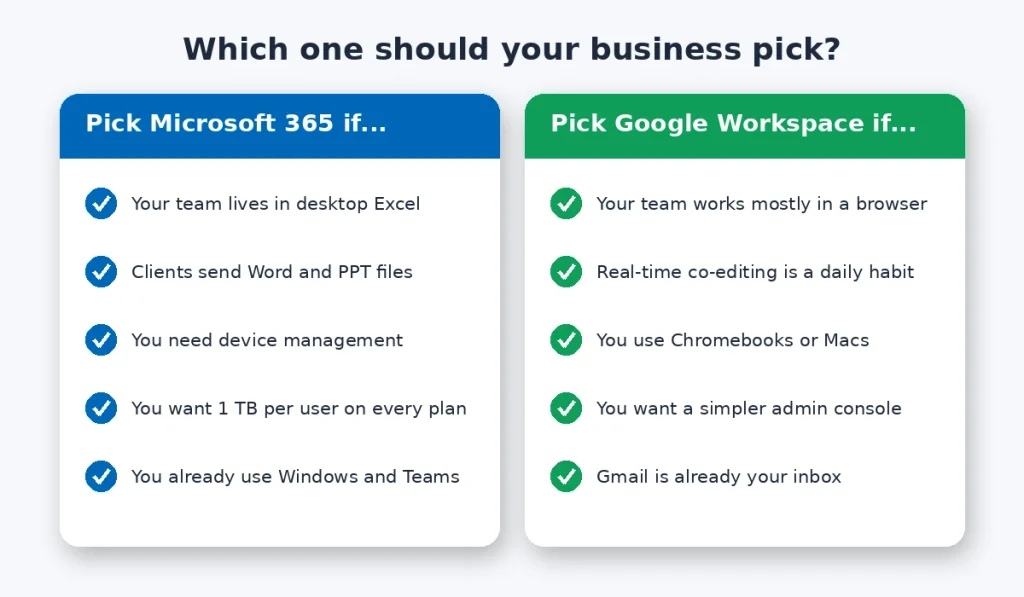
Choose Microsoft 365 if:
- Your bookkeeper, analyst, or estimator lives in desktop Excel.
- Your clients and partners send Word and PowerPoint files all day.
- You run Windows PCs and need device management (go with Business Premium).
- You want a full 1 TB of storage for every user, even on the cheapest plan.
Choose Google Workspace if:
- Your team works mostly in a browser and collaborates on documents constantly.
- You use Chromebooks, Macs, or a mix of devices.
- You want AI features without paying for an add-on.
- You’d rather have a simpler admin console with fewer settings to learn.
For a typical five-person marketing agency or real estate team, Google Workspace Business Standard is the better value. For a construction company, law firm, or accounting practice with Windows laptops in the field, Microsoft 365 Business Premium is worth the $22.
Realted: How to Activate Starlink Mini on an Existing Account
Your Next Step
Don’t decide from a feature chart. Sign up for the free trial of the plan you’re leaning toward (Google offers 14 days, Microsoft offers one month on its business plans), move one real project into it, and have your two most demanding users work there for a week. Their frustration, or lack of it, will tell you more than any comparison. If you’re also setting up email on your own domain, read our guide on how to set up a professional business email next.
Frequently Asked Questions
Is Google Workspace cheaper than Microsoft 365?
Not anymore. After Microsoft’s July 1, 2026 price increase, both suites list at $7, $14, and $22 per user per month on annual plans in the US. The real cost difference comes from add-ons. Google includes Gemini AI in its business plans, while Microsoft charges extra for full Copilot inside Word, Excel, and Teams.
Can I use Microsoft Office files in Google Workspace?
Yes. Google Docs, Sheets, and Slides can open, edit, and save Word, Excel, and PowerPoint files without converting them. Simple documents look fine, but complex formatting, macros, and advanced Excel features can break or display differently. If you trade heavily formatted Office files with clients every day, Microsoft 365 is the safer choice.
Which is better for small business, Microsoft 365 or Google Workspace?
It depends on how your team works. Google Workspace suits small teams that collaborate in a browser and want simple administration with AI included. Microsoft 365 suits businesses that rely on desktop Excel, exchange Office files with clients, or need to manage Windows laptops. Both cap their business plans at 300 users.
Does Microsoft 365 Business Basic include desktop apps?
No. Microsoft 365 Business Basic includes only the web and mobile versions of Word, Excel, PowerPoint, and Outlook, along with business email, Teams, and 1 TB of OneDrive storage per user. To install the full desktop apps on Windows or Mac computers, you need Business Standard, Business Premium, or Microsoft 365 Apps for business.
Can I switch from Google Workspace to Microsoft 365 later?
Yes. Both companies offer migration tools that move email, calendars, contacts, and files between platforms. Small teams can usually switch over a weekend, though larger moves take planning. Lower your DNS record TTL a few days before switching email so mail flow changes quickly, and keep the old account active for at least one billing cycle.