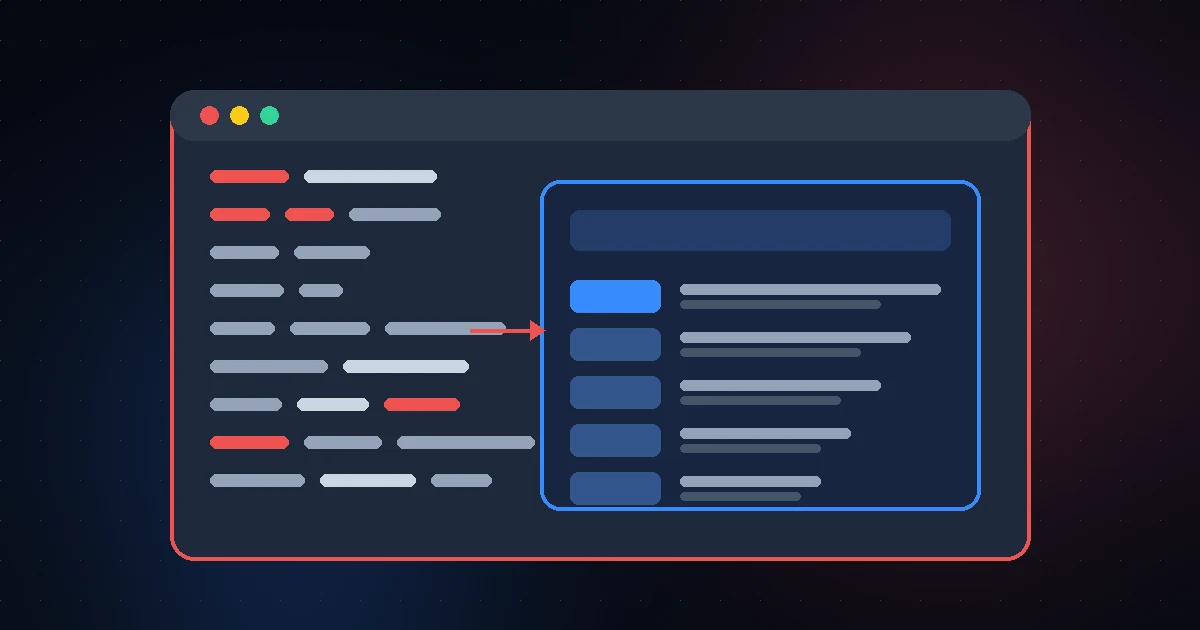
Pollora runs WordPress inside Laravel by flipping the usual setup: Laravel receives every request, WordPress core loads inside a Laravel service provider, and the Laravel router decides what to render using WordPress’s own conditional tags. The admin, the REST API, and your plugins keep working. If you’ve wanted Laravel’s routing, Blade, and container on a site your editors still manage in wp-admin, this is how that works under the hood.
Key Takeaways
- Pollora is a Laravel 13 app that boots WordPress core during Laravel’s own startup, not the other way around.
- Route::wp() matches pages with WordPress conditional tags like is_page() instead of URL patterns.
- Anything you don’t route falls back to the WordPress template hierarchy, rendered as Blade views.
- wp-admin, wp-login, REST, and AJAX still work, but some of them skip the Laravel router entirely.
- The cost: every page boots both frameworks, and WP-Cron is off until you pick a real scheduler.
What Pollora Is and Why Run WordPress Inside Laravel
Pollora is a framework that treats WordPress as a component of a Laravel application. You get the WordPress dashboard, the block editor, the plugin ecosystem, and the database your content team already knows. Developers get Laravel controllers, middleware, Eloquent, queues, and Blade on the front end.
That’s different from Acorn (from the Roots team), which keeps WordPress in charge and adds Laravel pieces to it. With Pollora, Laravel is the host, and its version numbers track the Laravel release it’s built on (the 13.x line runs on Laravel 13).
Who should run WordPress inside Laravel? Agencies and in-house teams that already write Laravel and keep getting handed WordPress sites. If your team has never touched Laravel, plain WordPress is still simpler.
The Project Layout: Where WordPress Lives Inside Laravel
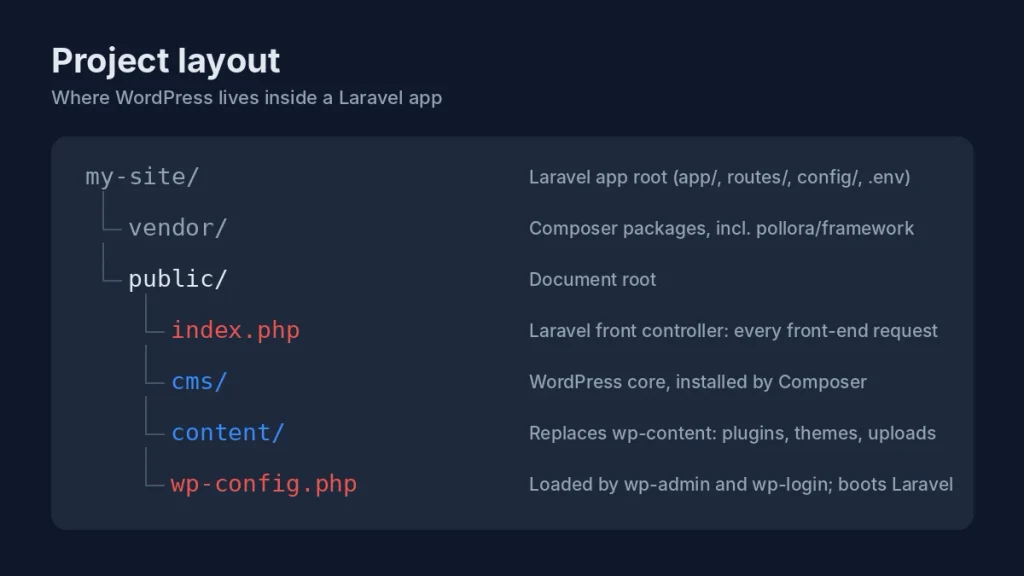
A Pollora project is a normal Laravel skeleton with WordPress installed by Composer under the document root. Four paths matter:
| Path | What it does |
|---|---|
| public/index.php | Laravel’s standard front controller. Every front-end request starts here. |
| public/cms/ | WordPress core, installed by Composer (set with wordpress-install-dir in composer.json). |
| public/content/ | Replaces wp-content. Plugins, themes, and uploads live here. |
| public/wp-config.php | The file WordPress’s own scripts load. In Pollora, it boots Laravel. |
The .htaccess file sends anything that isn’t a real file or folder to index.php. So the home page, a blog post URL, and /wp-json/ all reach Laravel. Meanwhile /cms/wp-login.php and /cms/wp-admin/ are real PHP files the server runs directly. Keep that split in mind, because it explains almost every “why does this behave differently?” moment later.
The Request Lifecycle, Step by Step
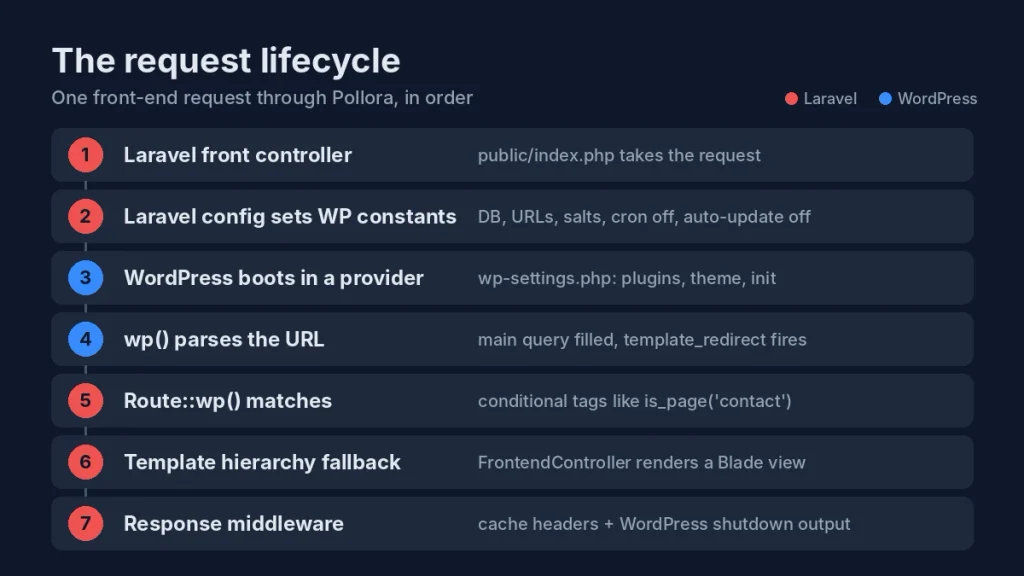
Here’s what happens when a visitor opens a post on a Pollora site. This sequence is the heart of how WordPress inside Laravel actually works.
1. Laravel’s front controller takes the request
Nothing WordPress-specific happens in index.php. The pollora/framework package hooks in through Laravel package discovery and registers roughly forty service providers. The one that matters most is WordPressServiceProvider.
2. Laravel config writes the wp-config constants
Before WordPress loads, Pollora defines the constants you’d normally hand-edit in wp-config.php, using Laravel config. A few defaults worth knowing:
- WP_AUTO_UPDATE_CORE is false. Core updates go through Composer.
- DISABLE_WP_CRON is true. Page views never trigger cron.
- WP_POST_REVISIONS is 5, which keeps the posts table from bloating.
- Database constants are copied from Laravel’s DB config, so WordPress and Eloquent share one connection setup.
Site URLs come from APP_URL, and salts come from your .env file. You can override any constant through the wordpress.constants config key. Pollora also loads WordPress’s plugin API early, so add_filter() exists before WordPress does, which lets earlier providers register hooks.
3. WordPress core boots inside a service provider
When the provider boots, Pollora checks for a working MySQL connection and then requires wp-settings.php. By the end of that call, your plugins, the theme’s functions.php, and the init and wp_loaded actions have all run, inside Laravel’s boot cycle.
Deprecation notices from WordPress and plugins are swallowed, while real errors go to Laravel’s handler. Requests under /api/ are “lightweight” and load no plugins by default (allow specific ones with wordpress.api_plugins).
4. WordPress parses the URL
Pollora then calls wp(), which matches the URL against WordPress rewrite rules and fills the main query. From here, is_single() and is_page() return real answers. The template_redirect action still fires, so canonical and plugin redirects behave normally. Robots.txt, feeds, and trackbacks are answered by WordPress directly. What WordPress doesn’t do is load its template-loader.php. Rendering belongs to Laravel.
5. Route::wp() matches on conditional tags
This is the part Laravel developers like most about WordPress inside Laravel. Pollora swaps in an extended router with two macros, Route::wp() and Route::wpMatch(). A WordPress route stores a condition instead of a URI:
Route::wp('single', [BlogController::class, 'show']);
Route::wp('page', 'contact', [ContactController::class, 'show']);
The second line runs is_page(‘contact’). Aliases like single, front, and tax map to is_single, is_front_page, and is_tax. Routes are tried in registration order, so normal URI routes and WordPress routes mix in routes/web.php the way you’d expect.
A middleware injects the current WP_Post, WP_Term, WP_User, or WP_Query into any controller parameter type-hinted with that class. And if a plain Laravel route like /dashboard matches, Pollora clears the 404 flag WordPress set, so the page doesn’t carry an error404 body class.
6. The template hierarchy is the fallback
If no route matches, a catch-all route sends the request to a FrontendController that copies WordPress’s template-loader logic. It walks the same checks (404, search, front page, single, page, archive), applies the template_include filter, and then renders the result as a Laravel view with the right HTTP status.
Blade templates in WordPress slot into this through filters. A candidate like single-book.php becomes single-book.blade.php, and Blade files rank ahead of PHP ones. Block themes still work too: if no Blade view exists, the block theme’s canvas template is used.
7. Middleware finishes the response
Two middleware run after your controller. One sets cache headers: for logged-out visitors, HTML gets public, must-revalidate, max-age=3600 by default instead of WordPress’s no-cache headers, and it respects DONOTCACHEPAGE. The other runs WordPress’s shutdown action in an output buffer and injects whatever it printed before the closing body tag.
Requests That Skip the Laravel Router
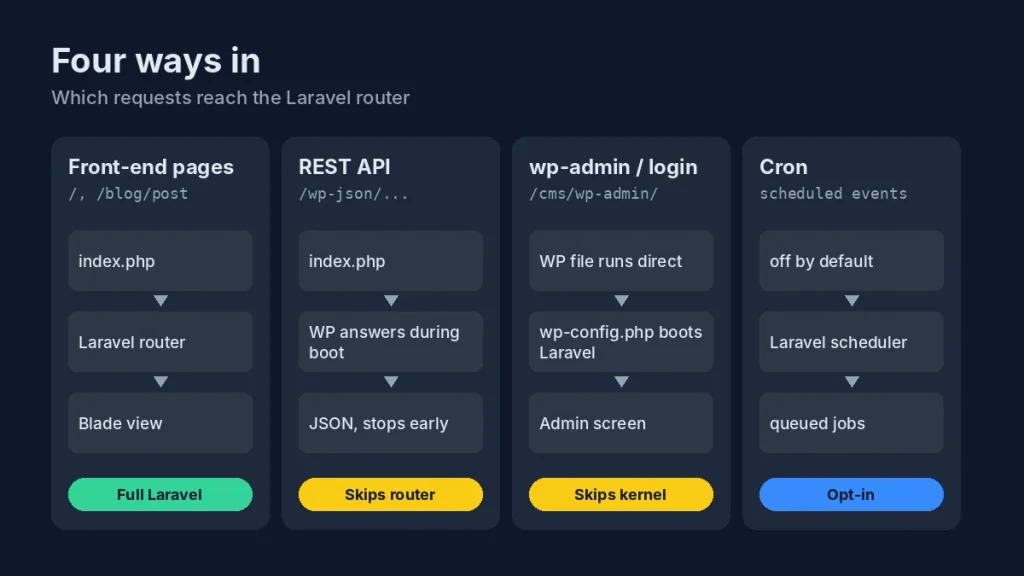
Not every request takes the path above. Running WordPress inside Laravel means a few WordPress paths need their own handling.
| Request | How Pollora handles it |
|---|---|
| wp-admin and wp-login | PHP runs the WordPress file directly. WordPress finds public/wp-config.php one folder up, which boots Laravel’s providers by hand. The HTTP kernel and router never run. |
| REST API (/wp-json) | Goes through index.php, but WordPress serves the response during provider boot and stops, before the Laravel router runs. Custom endpoints can use the #[WpRestRoute] attribute. |
| AJAX | admin-ajax.php lives in wp-admin, so it follows the admin path. The #[Ajax] attribute registers normal wp_ajax hooks. |
| Cron | Off by default. Turn on wordpress.use_laravel_scheduler to run WordPress events as Laravel jobs, or set a real server cron. |
That admin split fixed a real bug noted in the framework changelog: /cms/wp-login.php once matched the attachment rewrite rule and returned a 404. Pollora now skips wp() when the running script isn’t index.php.
WordPress Hooks as PHP Attributes and Laravel Events
Hooks get a cleaner syntax once WordPress runs inside Laravel. Instead of stacking add_action() calls in functions.php, you mark public methods with #[Action] or #[Filter] anywhere in app/. Pollora scans for them with spatie/php-structure-discoverer and registers each one with an instance from Laravel’s container, so constructor injection just works.
It also works in reverse. Selected WordPress actions become Laravel events. For example, the transition_post_status hook is turned into events like PostPublished, PostUpdated, and PostTrashed, which you can handle with ordinary Laravel listeners (and push onto a queue).
Performance and Trade-offs to Weigh First
Pollora caches discovered hooks and classes through Laravel’s cache, memoizes template lookups per request, and sends cache headers for anonymous visitors out of the box. Still, be honest about the costs before you commit:
- Every request boots both frameworks. Front-end pages run Laravel plus a full wp-settings.php, plugins included. The /api/ mode is the only built-in way to load less. Put a CDN or full-page cache in front of production.
- WordPress core is patched. Both WordPress and Laravel declare a global __() function, so a Composer patch renames WordPress’s version to __wp(). Run php artisan pollora:doctor after installs to confirm the patch is in place.
- Core updates go through Composer, not the dashboard’s update button. That’s a plus for version control, but it means someone owns updates.
- WP-Cron needs a decision. Scheduled posts won’t publish on time until you set up a real cron or the Laravel scheduler.
- Some plugins may act differently. Plugins that expect template-loader.php to include a PHP file still see the template_include filter, but the result renders as a view. Test page builders before launch.
Hosting matters too. Running WordPress inside Laravel with Pollora needs PHP 8.4 or newer, Composer 2, and MySQL 5.7+ or MariaDB 10.3+ (SQLite isn’t supported). Cheap shared hosting won’t cut it, so plan on a VPS or a managed Laravel host where you control PHP versions and cron.
If you’re still choosing your tools, our guide to the best free code editors for developers covers editors with strong PHP and Blade support.
How to Try WordPress Inside Laravel With Pollora
The quickest way to see it is a local install. Pollora’s installation guide lists two options:
Option 1: Composer create-project
This installs the latest stable release and launches the setup prompts for your site URL, database, and admin account.
composer create-project pollora/pollora example-appOption 2: Pollora CLI with DDEV
Install the CLI once, then create a project with a ready DDEV environment running PHP 8.4 and MariaDB.
composer global require pollora/cli
pollora new example-app --ddev
Need to rerun setup on an existing project, or confirm the WordPress core patch is in place? These Artisan commands cover both:
php artisan pollora:env:setup
php artisan pollora:install
php artisan pollora:doctor
Once it’s running, add one Route::wp(‘single’, …) route to a controller and dump the injected WP_Post. Seeing a post arrive as a type-hinted controller argument is the fastest way to understand how WordPress inside Laravel fits together. For the full technical walkthrough with source excerpts, read Pollora’s own guide, How Pollora runs WordPress inside Laravel, and WordPress’s official template hierarchy documentation.
Frequently Asked Questions
Can you run WordPress inside Laravel?
Yes. Frameworks like Pollora load WordPress core inside a Laravel service provider, so Laravel handles routing and rendering while WordPress still powers the admin, database, and plugins. You write controllers and Blade views, and your content team keeps using wp-admin and the block editor as usual.
What is Pollora in WordPress?
Pollora is a Laravel-based framework for building WordPress sites. It installs WordPress with Composer, boots it during Laravel’s startup, and replaces WordPress’s front-end templating with Laravel routing and Blade. It also adds PHP attributes for hooks, post types, and REST routes, plus Laravel events for WordPress actions.
Do WordPress plugins work with Pollora?
Most do. Plugins load normally when WordPress boots inside Laravel, and the admin, REST API, and AJAX keep working. Plugins that rely on WordPress’s template-loader including a PHP file may behave differently, since Pollora renders output as Laravel views. Test page builders and caching plugins on a staging site before launch.
What is the difference between Pollora and Acorn?
The difference is who’s in charge. Acorn, from the Roots team, keeps WordPress as the host and adds Laravel components to it. Pollora makes Laravel the host application and loads WordPress inside it, so the Laravel router decides what renders. Pick Acorn for a lighter add-on, Pollora for a Laravel-first build.
What PHP version does Pollora require?
Pollora requires PHP 8.4 or higher, according to its installation guide. You’ll also need Composer 2.x, MySQL 5.7+ or MariaDB 10.3+, and Node.js with npm for theme assets. SQLite isn’t supported because WordPress only loads on the MySQL driver. A VPS or managed Laravel host usually fits better than shared hosting.
Is WordPress inside Laravel slower than plain WordPress?
Each uncached request does more work, because it boots Laravel and a full WordPress, plugins included. Pollora offsets that with discovery caching, per-request template caching, and public cache headers for logged-out visitors. In production, a CDN or full-page cache in front of the site usually matters more than the framework overhead.
Your Next Step
If your team writes Laravel and maintains WordPress sites, spin up a local Pollora project this week and move one page type (start with single posts) onto Route::wp() and a Blade view. You’ll know within an afternoon whether running WordPress inside Laravel fits your workflow. Just budget time for cron, Composer-based updates, and plugin testing before anything goes live.