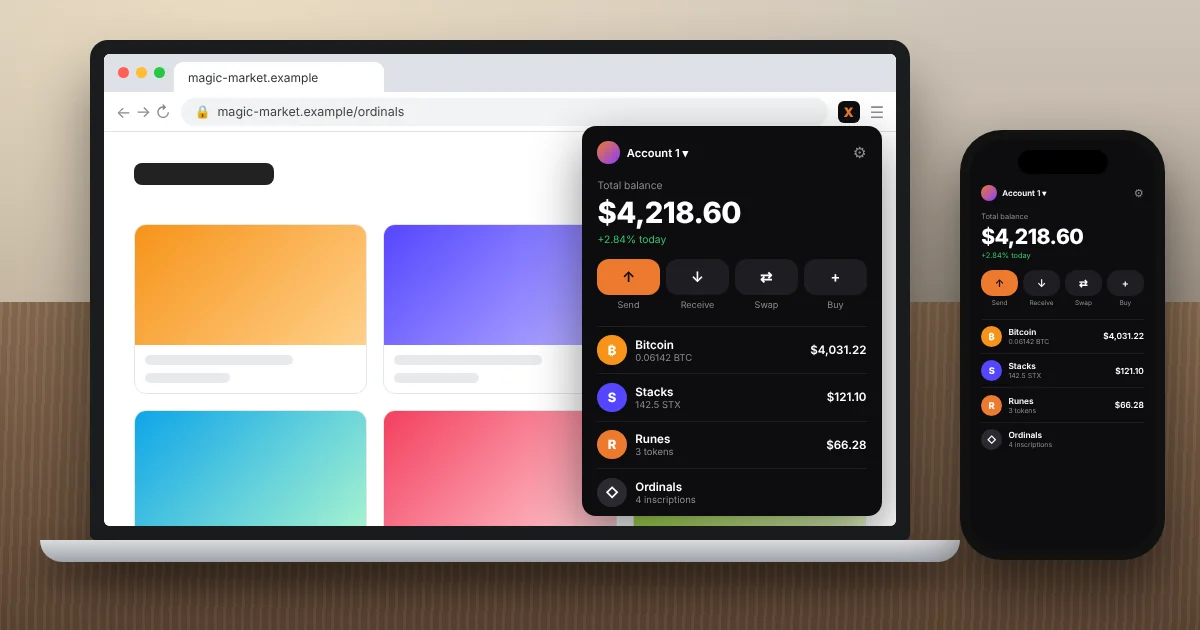
Xverse wallet is a free, self-custodial Bitcoin wallet you can use on desktop through a Google Chrome extension, plus apps for iPhone and Android. It holds BTC, Ordinals, Runes, BRC-20 tokens, and Stacks (STX), and it connects to Bitcoin apps and marketplaces. There’s no separate Windows or Mac program. On a computer, the Chrome extension is the desktop version.
I’ve installed the Xverse wallet extension on a handful of laptops, including a work machine that already had MetaMask and Phantom fighting for toolbar space. This guide covers how to install it safely, how its two Bitcoin addresses work, what it costs, and the mistakes that actually lose people money.
Key Takeaways
- Xverse wallet is free. You pay Bitcoin network fees, plus provider and swap fees when you use in-app swaps.
- On desktop, it’s a Chrome extension only. Any “Xverse for Windows” or Mac download file is fake.
- It gives you two Bitcoin addresses: Native SegWit (bc1q) for payments and Taproot (bc1p) for Ordinals and Runes.
- The extension supports Ledger and Keystone hardware wallets for safer signing.
- Xverse can’t reset your recovery phrase. Lose it and the funds are gone for good.
What Is Xverse Wallet?
Xverse wallet is a non-custodial wallet built by Secret Key Labs. Your private keys stay on your device, not on a company server, so nobody at Xverse can freeze, move, or recover your coins. The wallet is just the tool that holds your keys and signs transactions.
What makes it different from MetaMask or Phantom is focus. Xverse is built around Bitcoin first. According to Xverse’s official Bitcoin wallet page, you can buy, store, send, and receive BTC and manage Ordinals and Bitcoin NFTs in the same place. It also supports Bitcoin layer 2 networks like Stacks, Starknet, and Spark, and recent app updates added Lightning payments.
Here’s what you can hold in one Xverse wallet:
- Bitcoin (BTC) on the main network, plus Lightning payments
- Ordinals inscriptions and rare sats
- Runes and BRC-20 tokens
- Stacks (STX), sBTC, and SIP-10 tokens
- Starknet (STRK) and Spark tokens
If you mostly trade Ethereum or Solana tokens, this isn’t your main wallet. If you care about Bitcoin and its newer asset types, it’s one of the most widely supported options out there.
Xverse Wallet Desktop: Is There a Windows or Mac App?
No. This is the single most important thing to know before you search for a download. The official Xverse download page lists three versions: iOS, Android, and Chrome on desktop. It also states that Chrome is the only supported desktop browser.
So “Xverse desktop” really means the Xverse Chrome extension running on your Windows PC, Mac, or Chromebook. Sites offering an Xverse .exe or .dmg file are scams built to steal your recovery phrase. I’ve also seen lookalike Xverse add-ons on Firefox’s store with odd spellings in the name. Xverse doesn’t publish a Firefox version, so treat any of them as malware.
What about Brave, Edge, or Opera? Those Chromium-based browsers can usually install extensions from the Chrome Web Store, and plenty of people run Xverse that way. Just know it’s not officially supported, so if something breaks, Xverse support will likely tell you to switch to Chrome.
How to Install the Xverse Chrome Extension
Setup takes about five minutes. The only step worth slowing down for is your backup.
Step 1: Download from the Official Source
- Go to xverse.app/download and click the Chrome link. Don’t click search ads, since fake wallet ads are a common trap.
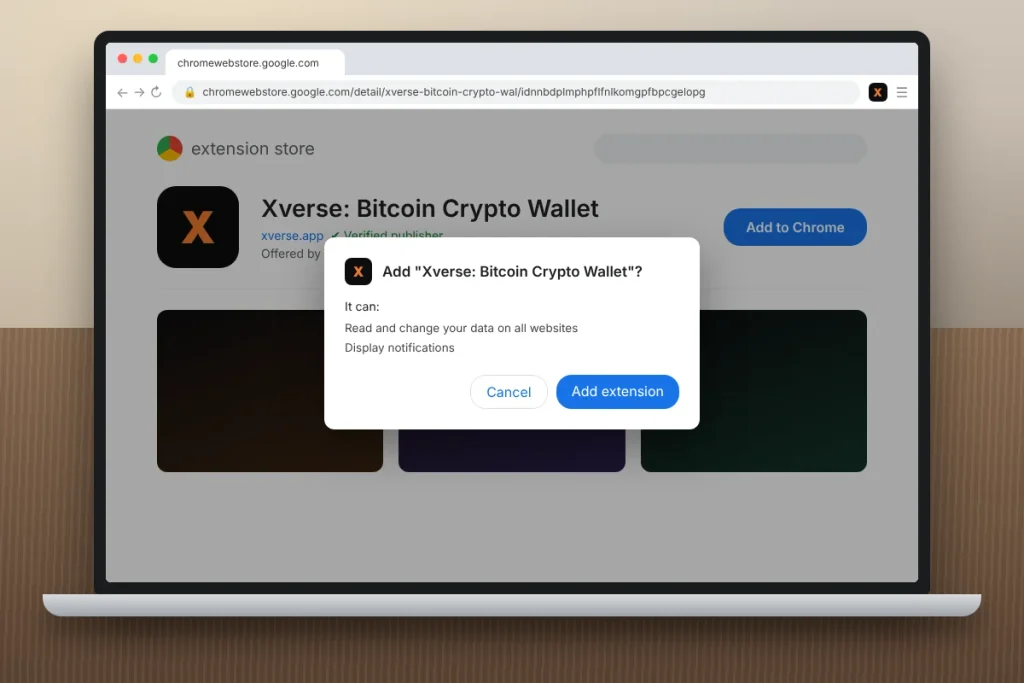
- On the Chrome Web Store, confirm the listing is called Xverse: Bitcoin Crypto Wallet and the developer is Secret Key Labs Limited. The real listing shows hundreds of thousands of users, not a few dozen.
- Click Add to Chrome, then Add extension.
- Click the puzzle-piece icon and pin Xverse to your toolbar, so you always know which icon you’re clicking.
Step 2: Create a New Xverse Wallet
- Open the extension and choose Create a new wallet.
- Write your recovery phrase on paper, in order. Don’t screenshot it or paste it into a notes app.
- Confirm the words when asked, then set a strong password. That password only locks this browser. It can’t recover the wallet on another device.
Step 3: Restore an Existing Wallet (Optional)
Already using Xverse on your phone, or another Bitcoin wallet like Leather, UniSat, or Phantom? Choose Restore an existing wallet and enter your phrase. Per Xverse’s import guide, the wallet detects the derivation path and scans for your addresses automatically. One catch: BTC sitting on a Taproot address from another wallet won’t be treated as spendable. Move it to your Native SegWit (bc1q) address to use it for payments and fees.
The extension updates on its own. If a feature you expect is missing, open chrome://extensions, find Xverse, and make sure you’re on the latest version.
Bitcoin and Ordinals Addresses in Your Xverse Wallet
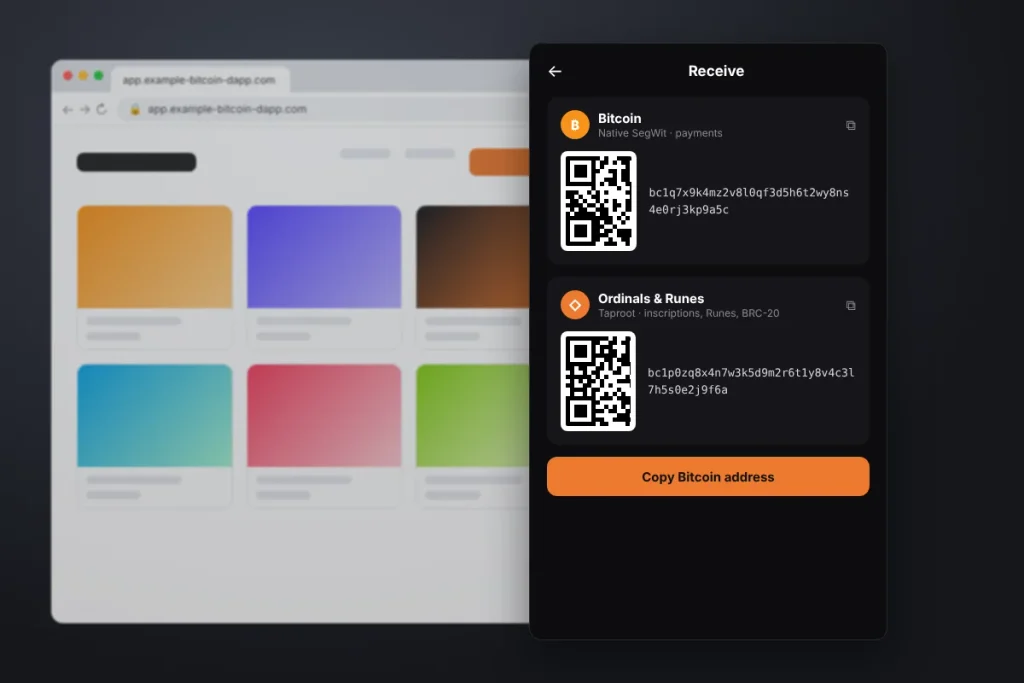
This is where most beginners get confused. Every Xverse wallet account has two main Bitcoin addresses, and they do different jobs.
| Address type | Starts with | Use it for |
|---|---|---|
| Native SegWit (payments) | bc1q | Receiving and sending regular BTC, paying network fees |
| Taproot (Ordinals) | bc1p | Ordinals inscriptions, Runes, BRC-20 tokens, rare sats |
| Nested SegWit (older) | 3 | Existing balances only; Xverse suggests moving to Native SegWit |
Xverse’s own address guide recommends Native SegWit for storing Bitcoin because it carries lower fees. My rule of thumb: when you withdraw BTC from Coinbase or Kraken, always paste the bc1q address. When you buy an Ordinal or Runes token on a marketplace, the app will request your bc1p address automatically. Keep regular BTC off the Taproot address, or you’ll waste time moving it back.
What You Can Do With the Xverse Browser Extension
Connect to Bitcoin Apps
The extension is the reason most people pick Xverse on desktop. Marketplaces like Magic Eden and Bitcoin DeFi apps put “Connect Xverse” right on their login screen. Connecting only shares your public addresses. Signing is what actually moves assets, so read every signing pop-up before you approve it.
Swap Tokens
You can swap Runes and other Bitcoin assets inside the extension, and swap BTC to STX and back. Xverse also runs a cross-chain swap page for moving ETH or SOL into Bitcoin, handled through a partner provider called Changelly. Before confirming, Xverse shows the network fee, the liquidity provider fee, and its own swap fee. Look at all three, plus the exchange rate, before you click.
Earn on Idle BTC and STX
The Earn section lets you stack STX for BTC rewards or stake BTC through partner protocols. Xverse advertises STX stacking rewards of up to 10% in BTC, but that’s a variable rate, not a promise. These are third-party protocols with their own smart contract risk, so start small.
Is Xverse Wallet Safe?
The software has been audited and has a long track record, but almost every loss I’ve seen came from the user side: a fake extension, a phishing link in a Discord DM, or a “support agent” on X asking for a recovery phrase. Here’s what actually keeps your Xverse wallet safe:
- Install only from xverse.app or the official app stores. No desktop installers exist.
- Never type your recovery phrase into a website. Real support will never ask for it.
- Ignore airdropped tokens and inscriptions you didn’t expect. Clicking their links is a classic drainer setup.
- Lock down your email and X accounts with an authenticator app, since scammers impersonate you from hijacked accounts.
The FTC’s crypto scam guide is a quick, useful read before you fund any wallet.
Use a Hardware Wallet for Larger Balances
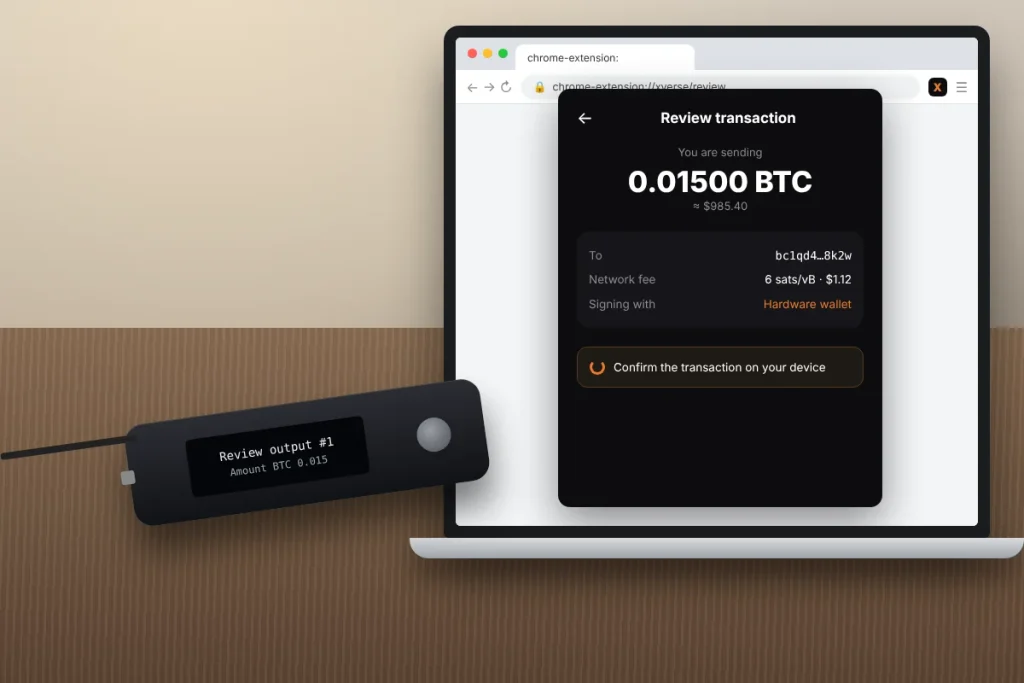
The desktop extension supports Ledger and Keystone hardware wallets, so every transaction needs a physical confirmation on the device. If you hold more than you’d be comfortable losing, this is worth the roughly $79 to $150 a hardware wallet costs.
One warning from Xverse’s Ledger support article: Ledger Live can’t see Ordinals or Runes. If you use the same Ledger in both apps, Ledger Live may spend your Ordinals as regular BTC. Keep a separate Ledger account (or a passphrase) just for your Xverse wallet.
Xverse Wallet Fees Explained
| Action | What you pay |
|---|---|
| Download and hold | Free |
| Send or receive BTC | Bitcoin network fee only, paid to miners |
| In-app swap | Network fee, provider fee, and an Xverse swap fee (shown before you confirm) |
| Buy crypto with a card | Partner provider fee, which varies by payment method |
Bitcoin network fees are set in sats per virtual byte and rise when the network is busy. Xverse doesn’t keep this fee, as its fee explainer notes. If a transfer isn’t urgent, send it on a weekend morning, when fees are often lower, and pick the slower fee option.
Xverse vs. MetaMask and Phantom
Use Xverse wallet if Bitcoin, Ordinals, Runes, or Stacks are your focus. It’s the most complete Bitcoin-first extension I’ve used. Use MetaMask for Ethereum and its layer 2 networks, and our MetaMask wallet guide walks through that setup. If you’re in the Solana world, read our Phantom wallet guide. Plenty of people run all three side by side without problems.
Crypto Taxes for US Xverse Wallet Users
The IRS treats crypto as property. Swapping BTC for a Runes token, selling an Ordinal, or receiving STX stacking rewards can all be taxable events. Starting with 2025 transactions, custodial brokers like Coinbase send Form 1099-DA, but a self-custodial Xverse wallet won’t send you any tax form. You’re responsible for tracking your cost basis. Export your history or use a crypto tax tool, and check the IRS digital assets page before you file.
Your First Day With Xverse Wallet
Install the Xverse wallet extension from xverse.app, back up your phrase on paper, and send yourself $20 of BTC to your bc1q address from an exchange. Then connect to one Bitcoin app, read the signing screen, and disconnect. Once that feels routine, add a hardware wallet for anything long term and secure your email with Microsoft Authenticator.
Frequently Asked Questions
Is Xverse wallet available for Windows or Mac?
Not as a standalone app. On Windows, Mac, and Chromebook, Xverse wallet runs as a Google Chrome browser extension, which is the official desktop version. Xverse also offers apps for iPhone and Android. Any website offering an Xverse .exe or .dmg installer is fake and likely designed to steal your recovery phrase.
Is Xverse wallet safe to use?
Xverse wallet is self-custodial and has been audited by outside security firms, so only you control your keys. Your safety mostly depends on your habits. Install only from xverse.app or official app stores, never share your recovery phrase, ignore unexpected airdrops, and connect a Ledger or Keystone hardware wallet for larger balances.
Does Xverse wallet charge fees?
Downloading Xverse and holding crypto in it is free. When you send Bitcoin, you pay a network fee that goes to miners, not Xverse. In-app swaps include a network fee, a liquidity provider fee, and an Xverse swap fee, all shown before you confirm. Buying crypto by card adds a partner provider fee.
What is the difference between my Bitcoin and Ordinals address in Xverse?
Your Bitcoin address starts with bc1q (Native SegWit) and is for sending and receiving regular BTC and paying fees. Your Ordinals address starts with bc1p (Taproot) and stores inscriptions, Runes, and BRC-20 tokens. Always withdraw BTC from an exchange to the bc1q address so it stays easy to spend.
Can I use Xverse wallet in the United States?
Yes. Xverse wallet works across the US for holding, sending, and swapping Bitcoin assets, since it’s self-custodial software. Buying crypto with a card runs through partner providers that verify your identity and may not be available in every state (New York’s BitLicense rules are a common example). Crypto gains and rewards are taxable, so keep records for the IRS.
What happens if I lose my recovery phrase?
If you can still open your Xverse wallet, open Settings and back up the phrase again right away. If you lose both your device and the phrase, the funds can’t be recovered. Xverse doesn’t store your keys, so no support agent can reset access. Anyone claiming they can is running a scam.