Minecraft for beginners comes down to three things: gather wood, build a shelter before the sun sets, and get a stone pickaxe as fast as you can. Do those in your first in-game day and you’ll survive long enough to start having real fun. Everything else (mining, farming, building, exploring) grows from that simple loop.
This guide walks you through it in order. You’ll learn which version to buy, what to do in your first 20 minutes, how to make it through the first night, and how to find iron and diamonds without falling into lava. It’s written for adults picking up the game for the first time and for parents who want to play alongside their kids.
Key Takeaways
- Most PC players should buy Minecraft: Java & Bedrock Edition ($29.99), which includes both versions.
- A full Minecraft day lasts 20 real minutes, so you have roughly 10 minutes before the first night.
- Punch trees first, then make a crafting table, a wooden pickaxe, and a stone pickaxe.
- Sleeping in a bed skips the night and sets your respawn point.
- Never dig straight down. Mine in a staircase or tunnel sideways instead.
Which Minecraft Edition Should Beginners Buy?
Minecraft comes in two main versions, Java Edition and Bedrock Edition. They look almost the same, but they don’t play together. A Java player can’t join a Bedrock world, and the reverse is also true. So if you want to play with friends or family, find out what they’re on first.
On PC, this choice mostly sorts itself out. Microsoft now sells Minecraft: Java & Bedrock Edition as one purchase for $29.99 on Windows, and you switch between versions in the same launcher. On consoles and phones, you get Bedrock only.
| Platform | Edition you get | Typical US price |
|---|---|---|
| Windows PC | Java and Bedrock together | $29.99 |
| Mac or Linux | Java (Bedrock isn’t native) | $29.99 |
| Xbox or PlayStation | Bedrock | $19.99 |
| Nintendo Switch | Bedrock | $29.99 |
| iPhone, iPad, Android | Bedrock | About $7 |
Prices change with sales, so check the official store at check the official Minecraft store before you buy. before you buy. If you already pay for Xbox Game Pass on PC or console, Minecraft is included, which makes it a no-risk way to try the game.
Java vs Bedrock: my quick recommendation
- Pick Bedrock if you’ll play with kids on an Xbox, Switch, iPad, or phone. Bedrock has crossplay across all of those.
- Pick Java if you want mods, the biggest community servers, or you’re on a Mac.
- On a Windows PC, you don’t have to choose. You get both.
Your First Settings: Survival, Difficulty, and Controls
When you create a new world, you’ll see a few game modes. Survival is the real game: you gather resources, manage hunger, and fight monsters. Creative gives you unlimited blocks and flight, which is great for building but skips the learning curve. Start in Survival.
Set difficulty to Easy or Normal for your first world. Peaceful removes hostile mobs entirely, which sounds nice but teaches you nothing. Easy is the sweet spot. Monsters still show up, but they hit softly and your hunger can’t kill you.
The basic controls on PC are W, A, S, D to move, Space to jump, left-click to break or attack, right-click to place or use, and E to open your inventory. Hold left-click on a block, don’t tap it. That trips up almost every new player for the first minute.
What to Do in Your First 20 Minutes
This is the order I recommend to every new player. It works on any edition, and it’ll have you armed and sheltered before dark.
- Punch a tree. Hold left-click on a log until it breaks. Collect 10 to 15 logs.
- Make planks. Open your inventory (E) and put logs in the small 2×2 grid. Each log gives 4 planks.
- Build a crafting table. Fill the 2×2 grid with 4 planks. Place it on the ground and right-click it to get a 3×3 grid.
- Make sticks. Stack 2 planks vertically to get 4 sticks.
- Craft a wooden pickaxe. Put 3 planks across the top row and 2 sticks down the middle column.
- Mine stone. Find a gray hillside and collect about 20 cobblestone.
- Upgrade to stone tools. Use the same recipes with cobblestone: a pickaxe, a sword, and an axe.
- Grab food and wool. Collect any animals you see. Three sheep give you enough wool for a bed.
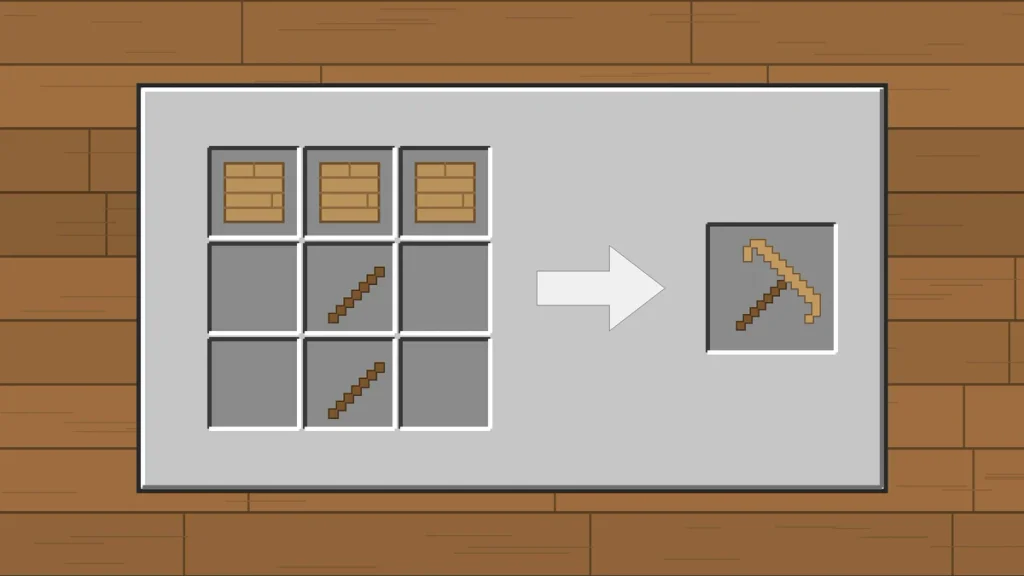
Skip wooden swords and wooden armor. Stone tools take about two minutes longer to get and last roughly twice as long. Wood is only there to get you to stone.
How to Survive Your First Night in Minecraft
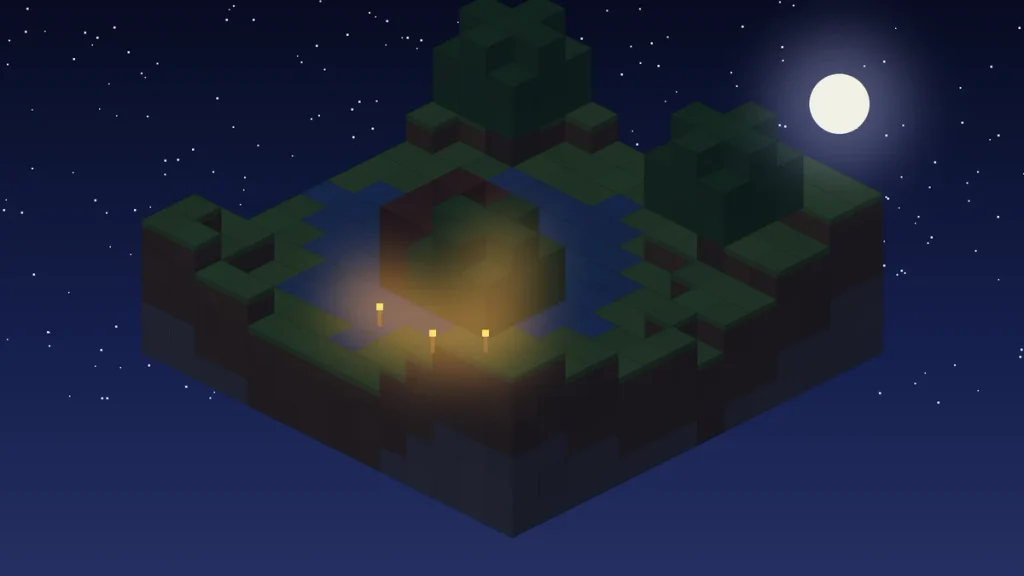
A full day-night cycle in Minecraft lasts 20 real minutes, and daylight covers about half of that. When the sun starts dropping, zombies, skeletons, spiders, and creepers begin spawning in the dark. Your goal for the first night is simple: be somewhere enclosed and lit.
Three shelter options, from fastest to best
- Dig into a hill. Tunnel three blocks into a hillside and seal the entrance behind you. It takes 30 seconds and it works.
- Build a dirt hut. A 5×5 box, three blocks tall, with a roof. Ugly, but nothing gets in.
- Build a small wood house. Better if you started early and have plenty of planks. Add a door (6 planks).
Light matters as much as walls. Craft torches by placing coal (or charcoal) above a stick, which gives you 4 torches. Put a few inside and around the outside. Hostile mobs need darkness to spawn, so a well-lit area stays mostly safe.
The best move is a bed. Craft one with 3 wool across the top and 3 planks underneath. Sleeping skips the night and sets your respawn point, so if you die you’ll come back home instead of at the original spawn. Skip sleep for three nights in a row and flying mobs called phantoms start showing up, which is a good reason to make a bed early.
Minecraft Survival Tips for Your First Week
Once you’ve made it through night one, you can slow down and play the way you want. These are the habits that keep new players alive.
Keep your hunger bar up
Your hunger bar sits next to your health. When it’s high, your health refills on its own. When it drops to 3 drumsticks, you can’t sprint anymore. Cooked food restores far more than raw, so build a furnace (8 cobblestone in a ring) and cook your meat. Steak and cooked pork chops are the best early foods.
For steady food, start a wheat farm. Break tall grass for seeds, till dirt near water with a hoe, and plant. Three wheat makes bread. It’s slow at first but it never runs out.
Know the mobs that matter
- Creepers: Green, silent, and they explode. Hit one, then step back. Don’t let them reach you.
- Skeletons: They shoot arrows from range. Use trees or walls to close the distance.
- Zombies: Slow and simple. A stone sword handles them.
- Endermen: Tall and black. Don’t look them in the eye and they’ll leave you alone.
Mining safely: the two rules
First, never dig straight down. You can drop into a cave, a ravine, or lava with no warning. Dig in a staircase pattern so you can always see the block in front of you. Second, never dig straight up. Sand and gravel fall, and they can bury you.
Carry a bucket of water once you have iron (3 iron ingots make a bucket). If you catch fire or find lava, pouring water turns it to obsidian or cobblestone and buys you time.
Where to find diamonds
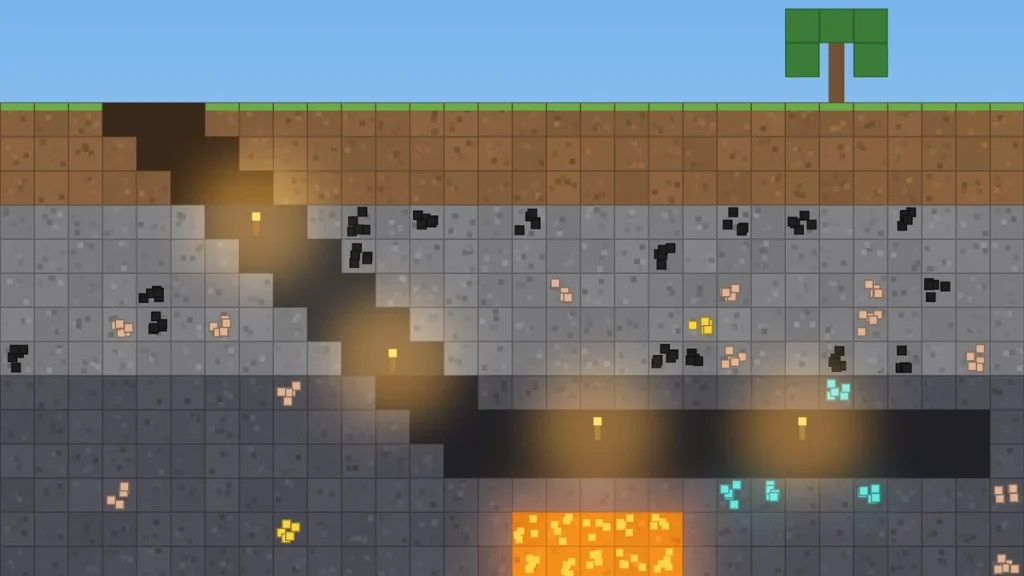
Since the Caves & Cliffs update, diamonds are most common near the bottom of the world, around Y level -58. Press F3 on Java to see your coordinates, or turn on “Show Coordinates” in Bedrock world settings. Iron is easier and shows up in large amounts around Y level 16, which is a good first mining target.
To mine diamonds, you need an iron pickaxe. A stone pickaxe will break the block and give you nothing. Staircase down to around -58, then tunnel sideways in a straight line and check the walls. Place torches as you go so you can find your way back.
Common Mistakes New Minecraft Players Make
I’ve watched a lot of first-time players, and the same handful of mistakes show up every time.
- Wandering too far on day one. You’ll lose your crafting table and your bearings. Stay within sight of where you started.
- Dying with full pockets. When you die, your items drop where you fell and vanish after 5 real minutes. Store valuables in a chest at home (8 planks).
- Using Peaceful too long. It’s fine for building with young kids, but it doesn’t prepare you for real survival.
- Ignoring the recipe book. The green book icon in your inventory shows every recipe you can make with what you’re holding. Use it.
Is Minecraft Good for Kids? A Note for Parents
Minecraft is rated E10+ (Everyone 10 and up) by the ESRB for fantasy violence. In practice, plenty of younger kids play it, especially in Creative mode. If your child plays online, set up parental controls through their Microsoft account. You can turn off chat, limit multiplayer to friends, and require approval for purchases on the Minecraft Marketplace.
A simple setup that works well: a private world or a paid Minecraft Realm (a small private server for friends and family) instead of public servers. It keeps strangers out and still lets kids build with cousins and classmates.
Frequently Asked Questions
How long is a day in Minecraft?
A full Minecraft day lasts 20 minutes of real time. Daytime runs about 10 minutes, followed by a short sunset, about 7 minutes of night, and a brief sunrise. That means beginners have roughly 10 minutes after spawning to gather wood, make basic tools, and build or dig a shelter before hostile mobs start appearing.
Should I play Minecraft Java or Bedrock as a beginner?
Play Bedrock if your friends or kids use Xbox, PlayStation, Switch, or phones, since Bedrock supports crossplay across those devices. Choose Java if you want mods or large community servers. On a Windows PC you get both in one $29.99 purchase, so you can try each and decide later without paying twice.
What is the first thing to do in Minecraft?
Punch a tree to collect logs, then turn them into planks and build a crafting table. Use the table to make sticks and a wooden pickaxe, mine about 20 cobblestone, and craft stone tools. After that, gather food and wool for a bed, and set up a lit shelter before your first night arrives.
Is Minecraft free to play?
No, the full game isn’t free. Minecraft costs $29.99 on PC for the Java and Bedrock bundle, around $19.99 on Xbox and PlayStation, and about $7 on phones. There is a free trial on most platforms, and the game is included with an Xbox Game Pass subscription. A limited browser version called Minecraft Classic is also free.
What Y level are diamonds at in Minecraft?
Diamonds are most common around Y level -58, near the bottom of the world in the deepslate layer. You need an iron pickaxe to collect them. Staircase down instead of digging straight down, then tunnel sideways and check the walls. Watch for lava pools, which are common at that depth, and carry a water bucket.
What age is Minecraft appropriate for?
The ESRB rates Minecraft E10+, meaning Everyone 10 and up, mainly for mild fantasy violence against monsters. Many younger children play safely in Creative mode or on Peaceful difficulty. For online play, parents should use Microsoft account family settings to limit chat, multiplayer, and purchases, or use a private Realm for family and friends.
Ready to Start Your First World?
Open the game, create a Survival world on Easy, and give yourself one goal for the first session: get a stone pickaxe and a bed before the sun goes down. That’s it. Once you’ve slept through your first night, you’ve learned the core loop, and the rest of Minecraft opens up from there. Bookmark this guide and come back to the mining section when you’re ready to go looking for diamonds.