If you see dasd using 100% CPU on macOS 27 Golden Gate, the right fix depends on which process is busy next to it. When appstoreagent is also near the top of Activity Monitor, a stuck Apple Arcade timer is the usual cause, and one Terminal command clears it. When dasd is pinned on its own and survives a restart, resetting a PowerLog telemetry database has worked for other Mac owners.
Both fixes for dasd using 100% CPU take about 10 minutes. Below, you’ll confirm which problem you have, apply the matching fix, and skip the steps that waste your time (like force quitting dasd over and over).
Key Takeaways
- dasd is Apple’s background task scheduler. On a healthy Mac it sits near 0% CPU most of the time.
- dasd plus appstoreagent, often overnight: reset the stuck Apple Arcade date with one
defaults writecommand. - dasd alone, even after a restart and Safe Mode: back up and reset the PowerLog background processing database.
- Force quitting dasd doesn’t help. macOS relaunches it within seconds.
- Install macOS 27.2 first, but Apple hasn’t said it fixes this bug, so recheck afterward.
What Is dasd on Mac?
dasd is the Duet Activity Scheduler daemon. It keeps a list of background jobs (Time Machine backups, Spotlight indexing, iCloud sync, software update cleanup) and decides when each one should run. As Howard Oakley explains in his breakdown of how macOS schedules background activities, it scores each job against conditions like battery level, charger status, heat, and whether you’re actively using the Mac.
That makes dasd a dispatcher, not a worker, which is why dasd high CPU usage is always a sign something is off. It should wake up, make a decision, and go quiet. Short spikes after you log in are normal.
Seeing dasd using 100% CPU for hours is a different story, and it’s one of the most searched macOS 27 problems right now. In Activity Monitor, 100% means one full CPU core. On an M-series MacBook that’s enough to make the bottom warm, spin up the fans on a MacBook Pro, and cut hours off your battery while the lid is closed.
Why Is dasd Using 100% CPU on macOS 27?
Since macOS 27 Golden Gate shipped on September 14, 2026, two separate causes of dasd using 100% CPU have been reported. They need different fixes, so before you tackle dasd high CPU, it pays to know which one you have.
Cause 1: A Stuck Apple Arcade Timer (dasd and appstoreagent)
In a MacRumors Forums thread started in late September, owners of MacBook Air, MacBook Pro, and Mac Studio models reported appstoreagent and dasd spiking from around midnight until about 9 AM. Community members traced this dasd high CPU loop to an Apple Arcade background task called ArcadeResetPO.
Here’s the loop. A preference named ArcadePayoutResetDate is supposed to move forward after the task runs. Instead, it stays stuck in the past. dasd sees the task as overdue and runs it, appstoreagent schedules it again with the same old date, and the cycle repeats nonstop. People saw the same behavior in the summer betas, so it’s a bug that shipped, not a fluke on your Mac.
Cause 2: A Bad PowerLog Database (dasd Alone)
On October 26, 2026, Paul Horowitz at OSXDaily described dasd using 100% CPU for several days straight on macOS 27.0.1. Killing the process, restarting, and booting into Safe Mode all failed. What finally worked was deleting a PowerLog telemetry file called CurrentBackgroundProcessingDB.BGSQL and restarting. He’s upfront that the root cause is unclear, and the database may only be a symptom of something deeper.
Not a Bug: Post-Upgrade Housekeeping
For the first day or two after a major upgrade, macOS reindexes Spotlight, scans your Photos library, and catches up on backups. That load mostly shows up under mds_stores, photoanalysisd, or backupd, not dasd. If those names top the list, leave your Mac plugged in for 48 hours before you change anything.
| What you see in Activity Monitor | Likely cause | What to do |
|---|---|---|
| dasd and appstoreagent both high, often overnight | Apple Arcade date loop | Fix 1 below |
| dasd alone near 100%, survives restart and Safe Mode | PowerLog database problem | Fix 2 below |
| mds_stores, mdworker_shared, or photoanalysisd high | Normal post-upgrade indexing | Wait 24 to 48 hours on power |
| backupd high | Time Machine catching up | Let the backup finish |
| dasd short spikes that settle in minutes | Normal scheduling | Nothing |
Step 1: Confirm dasd High CPU in Activity Monitor
Open Activity Monitor from Applications > Utilities (or press Command + Space and type it). Click the CPU tab, then sort by % CPU. dasd runs as a system process, so choose View > All Processes if you don’t see it.
If you spot dasd using 100% CPU, look at two things. First, is appstoreagent sitting right next to dasd? Second, check the CPU Time column. Several hours of CPU time on a Mac you barely touched overnight is a dead giveaway, even if the spike has already passed.
Prefer Terminal? This shows both processes, their CPU share, and how long they’ve been running:
ps -axo pid,%cpu,etime,command | grep -E '[d]asd|[a]ppstoreagent'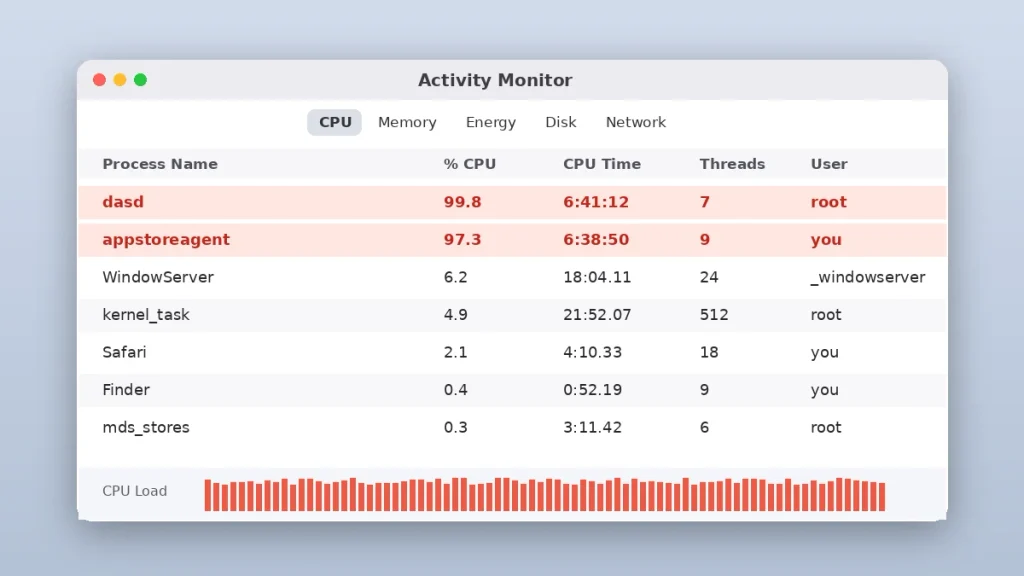
Step 2: Install macOS 27.2
Apple released macOS 27.2 on October 26, 2026, as build 26B123. Go to System Settings > General > Software Update and install it. The release notes talk about new Siri features and general bug fixes but don’t mention dasd, so treat the update as a free first attempt, not a guaranteed cure.
After the update, give your Mac one full night, then check Activity Monitor again. If you still see dasd using 100% CPU, move on to the fix that matches what you saw in Step 1.
Fix 1: Reset the Apple Arcade Date (dasd and appstoreagent High CPU)
Use this fix when appstoreagent is busy alongside dasd. It’s the most common reason for dasd using 100% CPU overnight. It changes one date in your own user preferences. No system files are touched, and it’s easy to undo.
Check the Date First
Open Terminal (Applications > Utilities) and run these two lines:
defaults read com.apple.appstored ArcadePayoutResetDate
date -u
The first line prints the stored Arcade date. The second prints the current time in UTC. If the stored date is earlier than right now while both processes are busy, you’ve found your loop. If it says the key doesn’t exist, this isn’t your problem, so skip to Fix 2.
Save the Original Value
defaults read com.apple.appstored ArcadePayoutResetDate > ~/Desktop/arcade-date-backup.txtPush the Date Forward and Restart appstoreagent
defaults write com.apple.appstored ArcadePayoutResetDate -date "$(date -v+7d -u +"%Y-%m-%dT%H:%M:%SZ")" && killall appstoreagentThis sets the reset date seven days ahead, then restarts appstoreagent so it reads the new value. macOS relaunches the agent on its own. Run it as your normal user, without sudo, because the preference belongs to your account. Avoid running it in the middle of an App Store download, since killall will interrupt it.
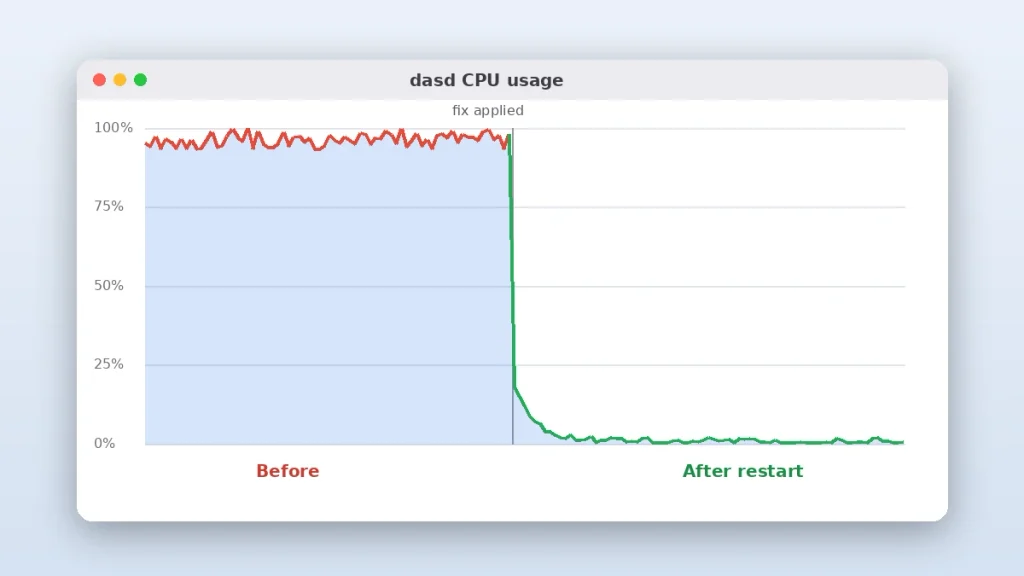
Within a minute, dasd and appstoreagent should fall to near zero, and your dasd high CPU problem should be gone. The catch: once that seven-day date passes, the loop can return. Some users park the date in 2099 instead, but nobody has tested what that does to Arcade bookkeeping over time. My advice is to stick with seven days and set a weekly calendar reminder until Apple ships a real fix.
To undo the change, delete the key and restart the agent:
defaults delete com.apple.appstored ArcadePayoutResetDate
killall appstoreagent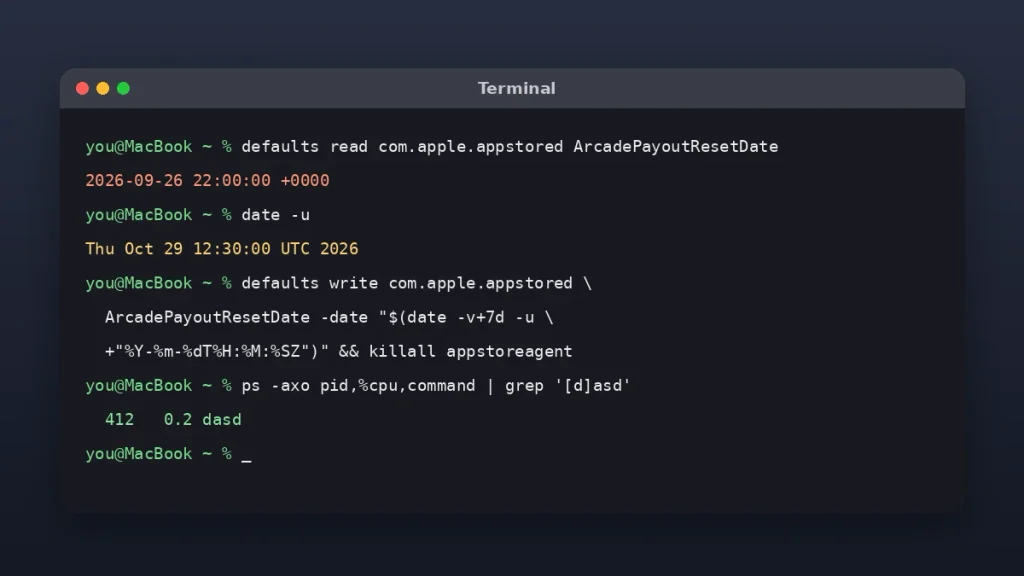
Fix 2: Reset the PowerLog Database (dasd Using 100% CPU Alone)
Use this when dasd is pinned by itself and nothing else has stopped the dasd high CPU usage. Fair warning: this deletes a system file that macOS is actively writing to. Run a Time Machine backup before you start, and type the paths exactly.
Back Up the Database Files
sudo mkdir -p ~/Desktop/PowerLog-Backup
sudo cp -p /private/var/db/powerlog/Library/PerfPowerTelemetry/BackgroundProcessing/CurrentBackgroundProcessingDB.BGSQL* ~/Desktop/PowerLog-Backup/
sudo chown -R "$(id -un)" ~/Desktop/PowerLog-Backup
Run these as three separate lines. The one-line version floating around joins them with a pipe symbol (|), which doesn’t wait for each step to finish. Separate lines (or &&) are the safer way.
Delete the Database and Restart
sudo rm /private/var/db/powerlog/Library/PerfPowerTelemetry/BackgroundProcessing/CurrentBackgroundProcessingDB.BGSQL /private/var/db/powerlog/Library/PerfPowerTelemetry/BackgroundProcessing/CurrentBackgroundProcessingDB.BGSQL-wal /private/var/db/powerlog/Library/PerfPowerTelemetry/BackgroundProcessing/CurrentBackgroundProcessingDB.BGSQL-shm
sudo reboot
Enter your Mac password when asked (Terminal won’t show the characters as you type). If you get “Operation not permitted,” give Terminal access under System Settings > Privacy & Security > Full Disk Access, then try again.
After the restart, wait about 10 minutes and rerun the ps command from Step 1. dasd should be back near 0% instead of using 100% CPU. macOS creates a fresh database on its own, so there’s nothing to restore unless something goes wrong.
What Not to Do When dasd Is Using 100% CPU
- Don’t keep force quitting dasd. launchd restarts it right away, and the cause is still there.
- Don’t freeze appstoreagent with kill -STOP. It stops the loop, but it also stops App Store updates and license checks until you resume it.
- Don’t turn off System Integrity Protection. Neither fix needs it.
- Don’t pay for a “Mac cleaner” app to fix this. These are two specific settings and files, and you can handle both for free in Terminal.
- Don’t turn off automatic updates as your only fix. It may quiet appstoreagent, but it leaves your apps unpatched and doesn’t touch the Arcade date.
Related: MacBook Pro Keyboard Shortcuts
Frequently Asked Questions
What is dasd on a Mac?
dasd is the Duet Activity Scheduler daemon, a built-in macOS process that decides when background jobs run. It schedules tasks like Time Machine backups, Spotlight indexing, and iCloud sync based on battery, heat, and activity. Normally it uses almost no CPU, so dasd using 100% CPU for long stretches points to a bug or a stuck task.
Is it safe to force quit dasd in Activity Monitor?
Force quitting dasd won’t damage your Mac, but it won’t fix anything either. macOS relaunches it within seconds because the system depends on it to schedule background work. If dasd high CPU usage returns after it restarts, find the cause instead, such as the Apple Arcade date loop or the PowerLog database issue.
Why does my Mac get hot overnight on macOS 27?
A common cause on macOS 27 is dasd and appstoreagent looping on a stuck Apple Arcade task, often from around midnight to 9 AM. Spotlight reindexing, Photos analysis, and Time Machine can also keep a Mac busy after an upgrade. Check Activity Monitor in the morning and look at the CPU Time column.
Does macOS 27.2 fix dasd high CPU?
Apple hasn’t said it fixes dasd using 100% CPU. macOS 27.2, released October 26, 2026, lists general bug fixes and new Siri features but doesn’t mention dasd or appstoreagent. Install it anyway, since it’s free and includes security fixes, then watch Activity Monitor for a night. If the problem returns, use the Terminal fixes in this guide.
Is dasd a virus or malware?
No. dasd is a genuine Apple system process that ships with every modern version of macOS. In Activity Monitor, the real one runs under the root user. High CPU from dasd almost always comes from a bug or a stuck background task, not malware, so you don’t need to buy antivirus software to fix it.
Will changing ArcadePayoutResetDate affect my Apple Arcade games?
Nothing in public reports suggests it does. The task involved is described as an Arcade developer payout reset, not something tied to your saved games or subscription. The seven-day version is the safest choice because it stays close to normal behavior. Avoid dates years in the future, since nobody has tested their long-term effect.
Your Next Step
Open Activity Monitor right now and check one thing: is appstoreagent busy next to dasd? If yes, run Fix 1. If dasd is alone and still pinned after installing macOS 27.2, back up with Time Machine and run Fix 2. Either way, you should have a cool, quiet Mac by tonight.
If neither fix works, send Apple a report through Apple Feedback or call AppleCare at 1-800-275-2273. Mention that you see dasd using 100% CPU and list the fixes you’ve already tried, so the support rep doesn’t start you from scratch.